<?xml version="1.0" encoding="utf-8"?>
<feed xmlns="http://www.w3.org/2005/Atom">
  <title>ParadeSmart Blog</title>
  <subtitle>Insights, tips, and best practices for Home Builders Association parade coordinators, builders, and event professionals.</subtitle>
  <link href="https://paradesmart.com/feed.xml" rel="self"/>
  <link href="https://paradesmart.com/blog/"/>
  <updated>2026-07-16T00:00:00Z</updated>
  <id>https://paradesmart.com/blog/</id>
  <author>
    <name>ParadeSmart Team</name>
    <email>support@paradesmart.com</email>
  </author>
  
  <entry>
    <title>The ParadeSmart Builder Guide: Logging In, Updating Your Profile, and Entering Your Home Information</title>
    <link href="https://paradesmart.com/blog/paradesmart-builder-setup-guide/"/>
    <updated>2026-07-16T00:00:00Z</updated>
    <id>https://paradesmart.com/blog/paradesmart-builder-setup-guide/</id>
    <summary>A complete walkthrough for builders on logging into ParadeSmart, setting up a builder profile, and filling out every home information field — including GPS coordinates, directions, and video tours.</summary>
    <content type="html"><![CDATA[<h3 id="a-field-by-field-walkthrough-for-builders-participating-in-a-parade-of-homes" tabindex="-1">A field-by-field walkthrough for builders participating in a Parade of Homes</h3>
<p>If you’re a builder in a Parade of Homes powered by ParadeSmart, your parade organizer has already set up your account — there’s nothing to register or sign up for. This guide walks through everything you’ll do on your end: logging in, updating your builder profile, and entering the details visitors will see when they browse your home in the app and on the website.</p>
<h2 id="logging-in" tabindex="-1">Logging In</h2>
<p>Your builder login is created automatically by your parade organizer, so there’s no account to create. Your organizer will provide your username and password directly.</p>
<ol>
<li>Go to <a href="https://app.paradesmart.com/accounts/login/"><strong>https://app.paradesmart.com/accounts/login/</strong></a></li>
<li>Enter the username and password provided by your parade organizer</li>
<li>Click <strong>Login</strong> — you’ll land on your builder dashboard</li>
</ol>
<p><strong>Forgot your password?</strong> For security reasons, passwords cannot be viewed or recovered, even by ParadeSmart. Your parade organizer can set a new one for you at any time — just ask.</p>
<p><strong>Seeing a “Forbidden (403)” or “CSRF verification failed” error?</strong> This usually happens if you have multiple login tabs open or a restored old browser tab. Click into the address bar, press Enter to reload the page, and try again.</p>
<h2 id="updating-your-builder-profile" tabindex="-1">Updating Your Builder Profile</h2>
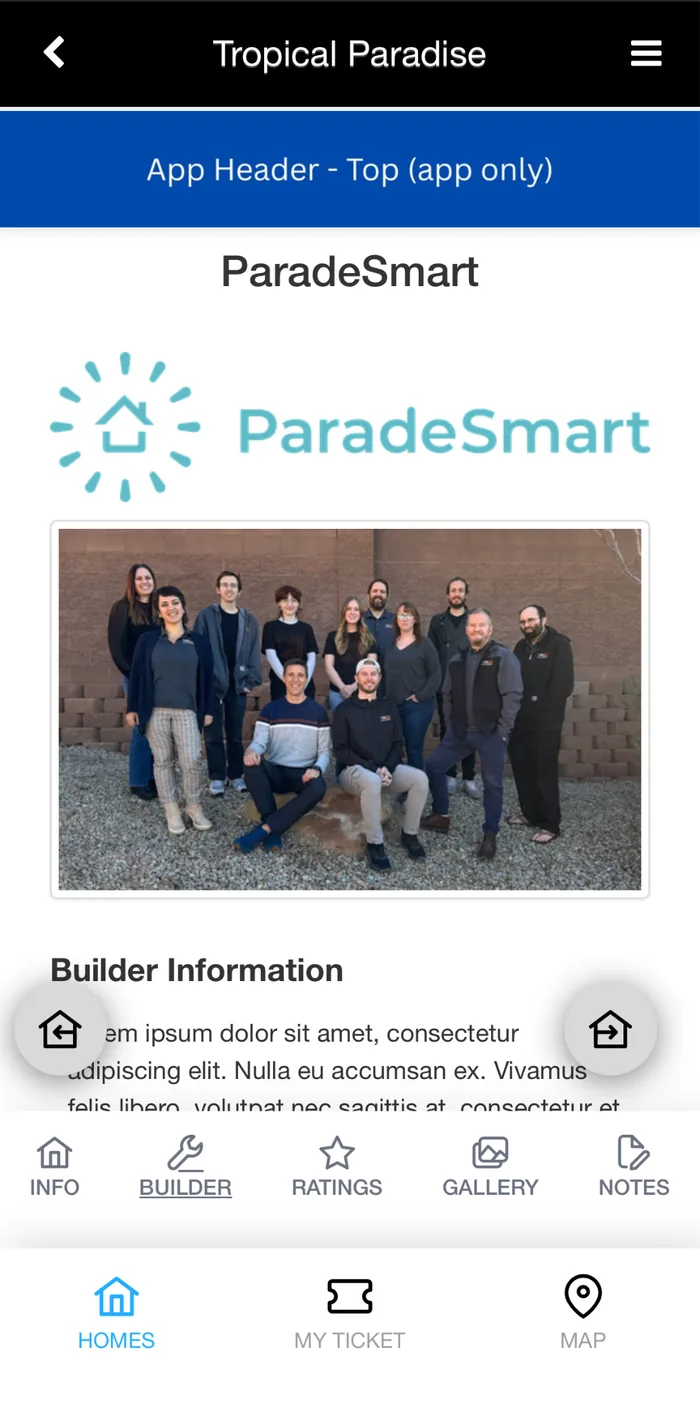
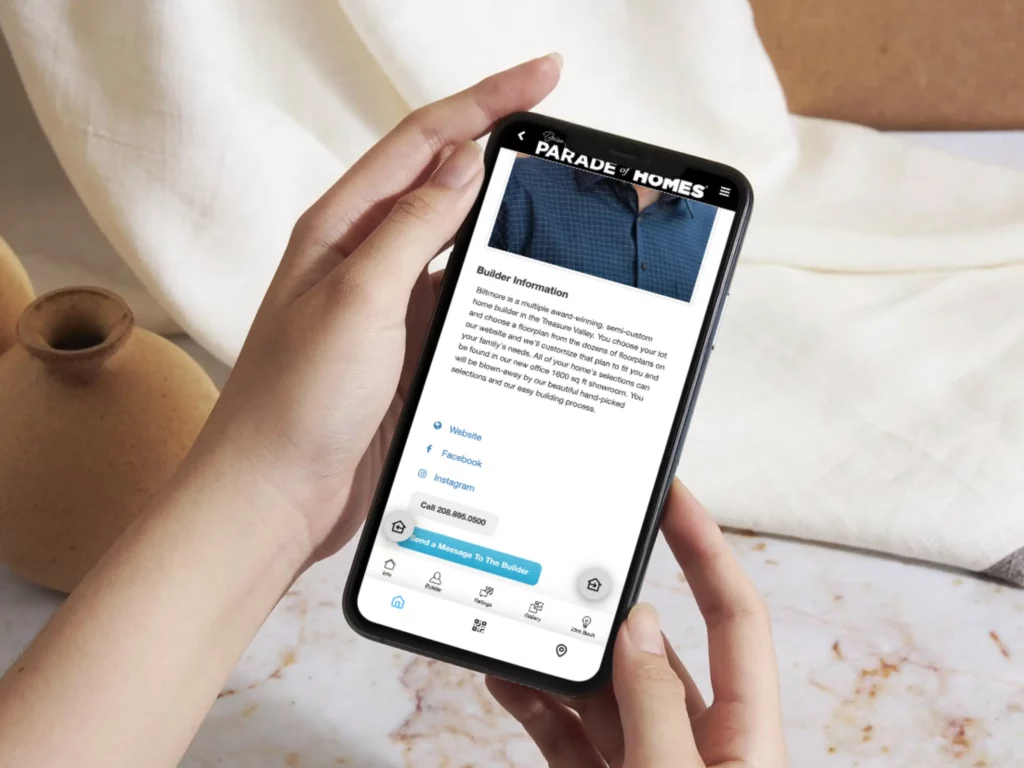
<p>Your builder profile is what visitors see when they tap your company name in the app. It can include your logo, an About section, and your contact information.</p>
<p><img src="/assets/img/blog/paradesmart-builder-setup-guide--app-builder-profile-screen.webp" alt="ParadeSmart app builder profile screen showing company logo and about section"></p>
<ol>
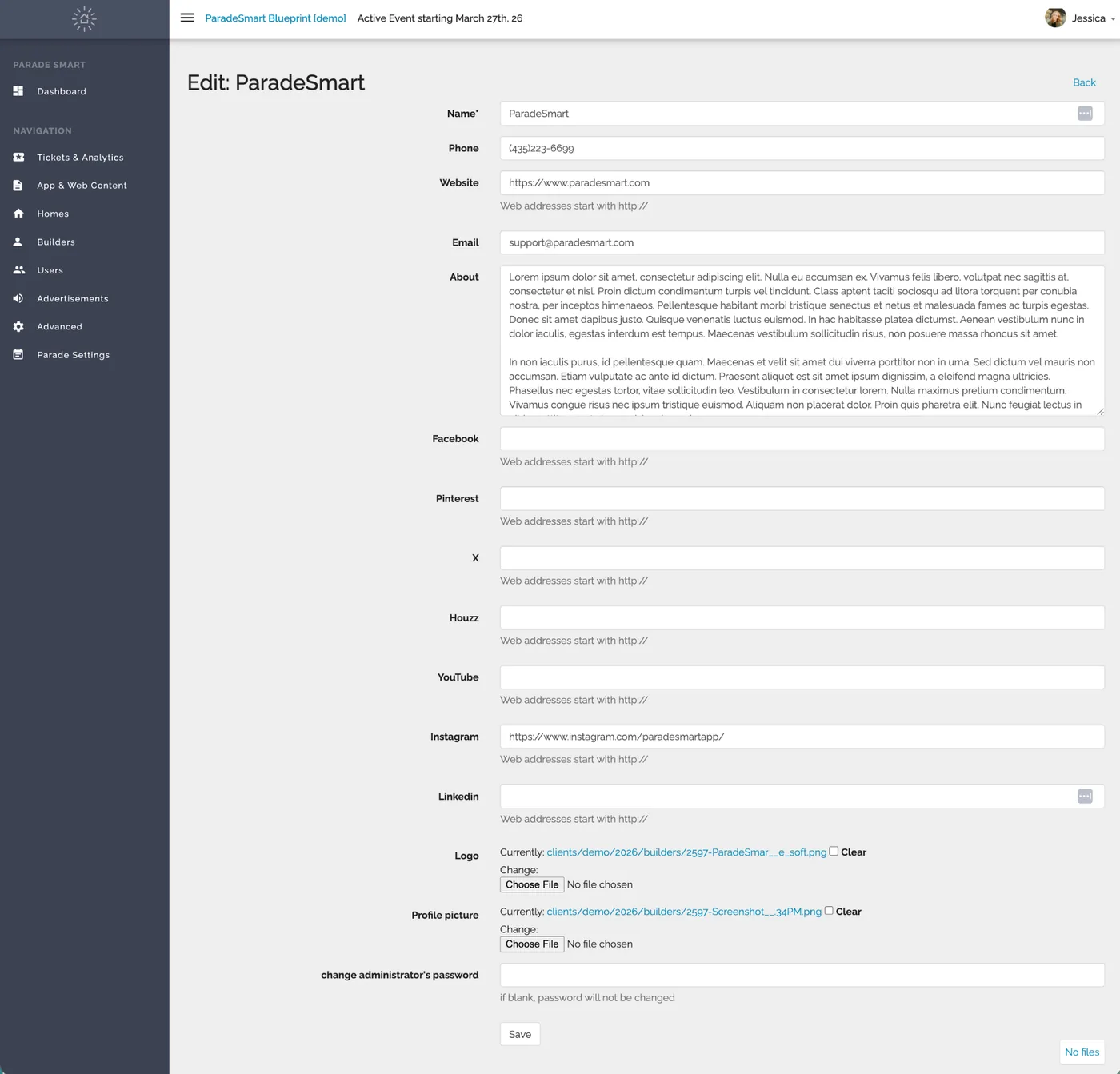
<li>From your dashboard, find your builder profile and click <strong>Edit</strong></li>
<li>Upload your company logo and profile photo</li>
<li>Write a short About section — a couple of friendly sentences about your company is perfect</li>
<li>Add your email, website, phone, and social media links</li>
<li>Click <strong>Save</strong></li>
</ol>
<p><img src="/assets/img/blog/paradesmart-builder-setup-guide--edit-builder-profile-dashboard.webp" alt="Edit builder profile dashboard screen with fields for name, phone, website, email, about section, social links, and logo upload"></p>
<p><strong>Heads up:</strong> Your builder profile will only appear in the app if it includes an About section or a logo. If your profile seems to be missing, that’s usually why.</p>
<h2 id="entering-your-home-information" tabindex="-1">Entering Your Home Information</h2>
<p>This is the information visitors will see when they browse the parade. Complete, accurate info makes your home easier to find and more appealing in the listings. Below is every field, what it means, and what to enter. Your event may have additional fields beyond these.</p>
<h3 id="basic-info" tabindex="-1">Basic Info</h3>
<table>
<thead>
<tr>
<th>Field</th>
<th>What to enter</th>
</tr>
</thead>
<tbody>
<tr>
<td>Home / Model Name</td>
<td>The name that appears in the app’s listings — usually your plan or model name (for example, “The Aspen”).</td>
</tr>
<tr>
<td>Home / Model Description</td>
<td>A description of the home. Highlight what makes it special: design features, finishes, the story behind it. This is your chance to sell the experience.</td>
</tr>
<tr>
<td>Primary Image</td>
<td>Your rendering, front elevation, or main photo — the first thing visitors see in the listings. If nothing is uploaded, a “Coming Soon” image displays instead.</td>
</tr>
<tr>
<td>Street Address</td>
<td>First line only. No city, state, or zip — those have their own fields.</td>
</tr>
<tr>
<td>City</td>
<td>The city the home is located in.</td>
</tr>
<tr>
<td>Written Directions</td>
<td>Helpful turn-by-turn notes, especially for homes in new developments where GPS apps may struggle. Example: “From Main St, turn east on Canyon Rd, follow signs past the model home.”</td>
</tr>
</tbody>
</table>
<h3 id="pricing" tabindex="-1">Pricing</h3>
<table>
<thead>
<tr>
<th>Field</th>
<th>What to enter</th>
</tr>
</thead>
<tbody>
<tr>
<td>Price</td>
<td>The price of the home. Numbers only work best (no $ or commas needed).</td>
</tr>
<tr>
<td>Price Without Lot</td>
<td>The base price of the model, or the price without the lot.</td>
</tr>
<tr>
<td>Is this home for sale?</td>
<td>Yes or No.</td>
</tr>
</tbody>
</table>
<h3 id="location" tabindex="-1">Location</h3>
<table>
<thead>
<tr>
<th>Field</th>
<th>What to enter</th>
</tr>
</thead>
<tbody>
<tr>
<td>Latitude</td>
<td>Numbers, minus signs, and periods only (example: 40.760780). See below for how to find this.</td>
</tr>
<tr>
<td>Longitude</td>
<td>Numbers, minus signs, and periods only (example: -111.891045). See below for how to find this.</td>
</tr>
</tbody>
</table>
<h3 id="home-details" tabindex="-1">Home Details</h3>
<table>
<thead>
<tr>
<th>Field</th>
<th>What to enter</th>
</tr>
</thead>
<tbody>
<tr>
<td>SQFT</td>
<td>Total square footage. Numbers only.</td>
</tr>
<tr>
<td>Bedrooms</td>
<td>Number of bedrooms.</td>
</tr>
<tr>
<td>Bathrooms</td>
<td>Number of bathrooms.</td>
</tr>
<tr>
<td>Garages</td>
<td>Number of garage stalls. Numbers only.</td>
</tr>
<tr>
<td>Floors</td>
<td>Number of floors/levels.</td>
</tr>
<tr>
<td>Subdivision</td>
<td>The name of the subdivision or community.</td>
</tr>
<tr>
<td>Subdivision Info</td>
<td>Any extra details about the community: amenities, HOA info, nearby attractions.</td>
</tr>
</tbody>
</table>
<h3 id="media" tabindex="-1">Media</h3>
<table>
<thead>
<tr>
<th>Field</th>
<th>What to enter</th>
</tr>
</thead>
<tbody>
<tr>
<td>Video Tour</td>
<td>A YouTube or Vimeo embed URL — not your company website. See below for exactly how to find the right link.</td>
</tr>
<tr>
<td>360 Virtual Tour</td>
<td>Your Matterport link. See below.</td>
</tr>
</tbody>
</table>
<h2 id="finding-your-latitude-and-longitude" tabindex="-1">Finding Your Latitude and Longitude</h2>
<p>Accurate coordinates put your home’s pin in exactly the right spot on the parade map. The address alone is often not enough, especially in new developments. Here’s the easiest way to find them using Google Maps:</p>
<ol>
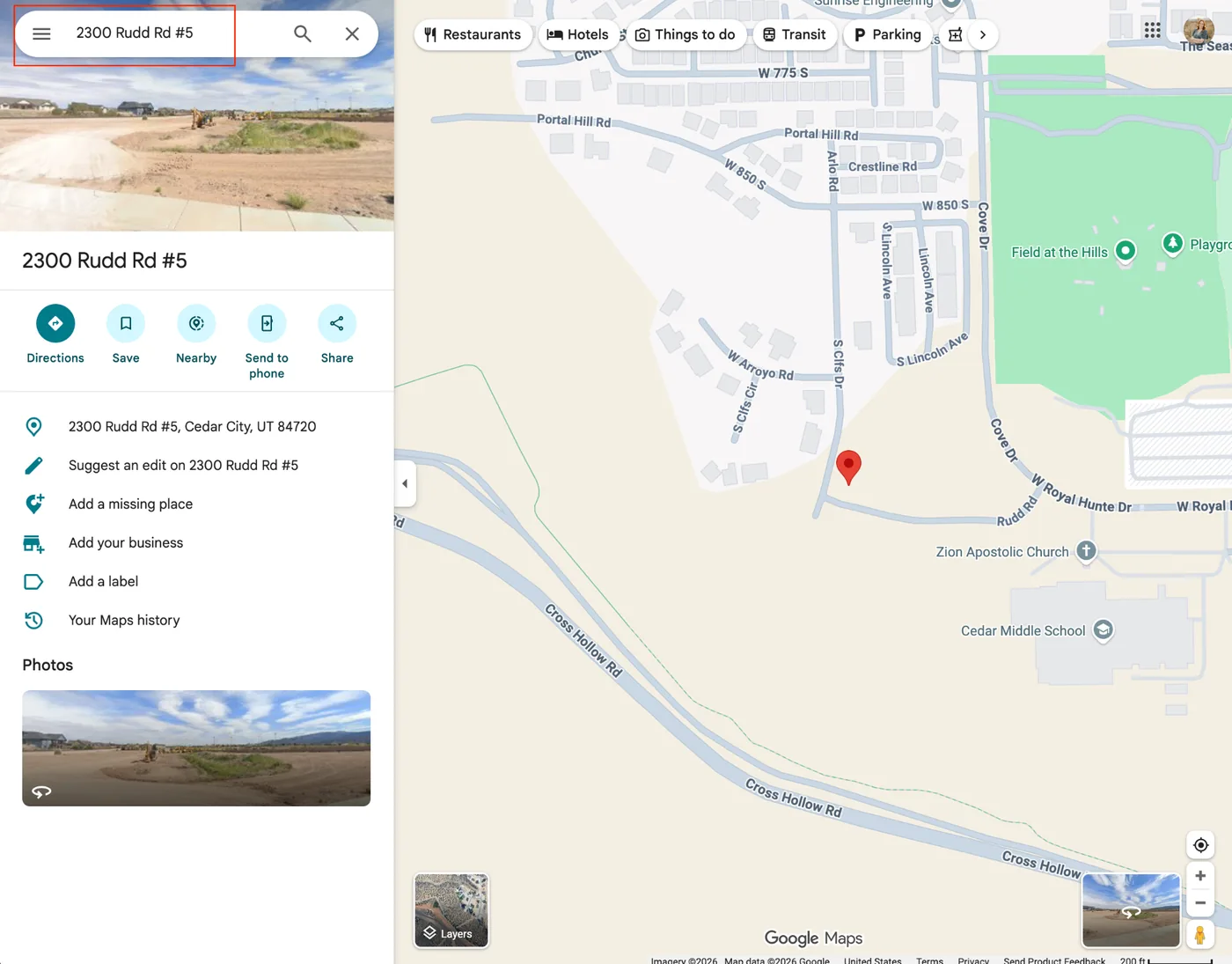
<li>Open Google Maps and type in the address to see what location it gives you. Newer subdivisions may not be recorded yet — in that case, right-click a well-established road next to the subdivision instead.</li>
</ol>
<p><img src="/assets/img/blog/paradesmart-builder-setup-guide--google-maps-address-search.webp" alt="Google Maps search for a street address showing the pinned location and nearby roads"></p>
<ol start="2">
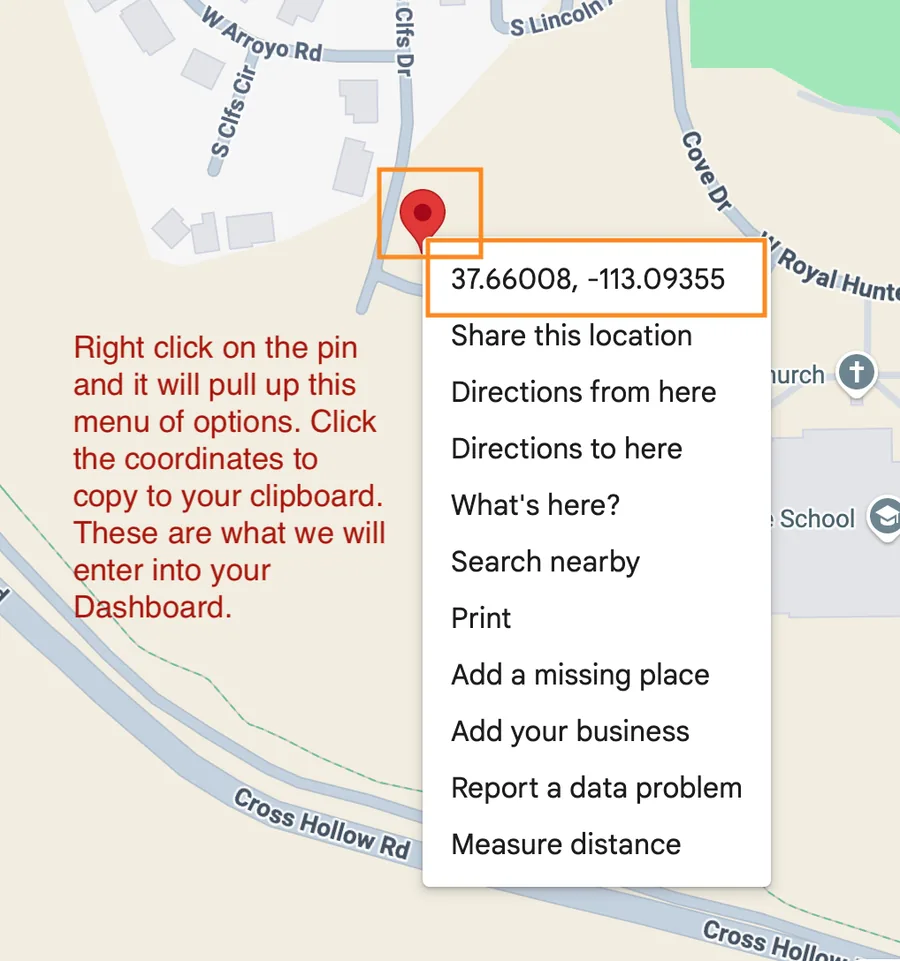
<li>Right-click the pin. A secondary menu pops up showing the coordinates. Click those to copy them to your clipboard.</li>
</ol>
<p><img src="/assets/img/blog/paradesmart-builder-setup-guide--google-maps-coordinates-popup.webp" alt="Google Maps right-click menu showing latitude and longitude coordinates at the top, ready to copy"></p>
<ol start="3">
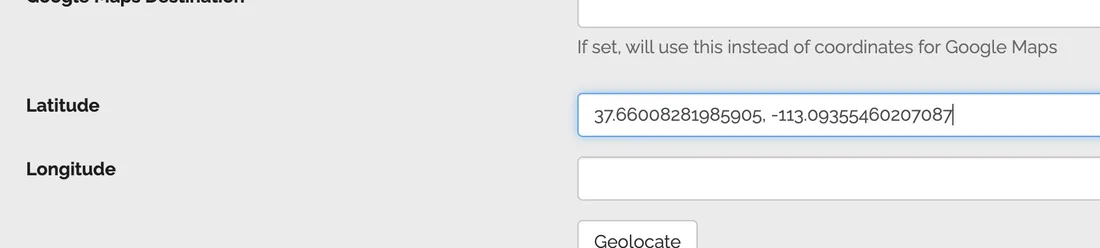
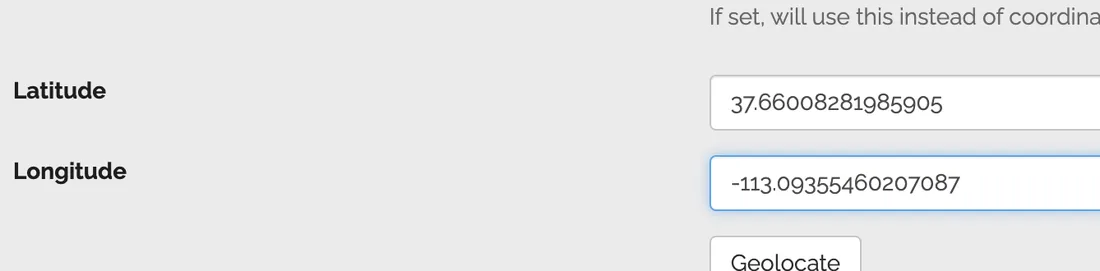
<li>With the coordinates copied, paste the full line into the Latitude field, then highlight, cut, and remove the longitude portion. Paste the longitude into the Longitude field.</li>
</ol>
<p><img src="/assets/img/blog/paradesmart-builder-setup-guide--paste-coordinates-into-latitude-field.webp" alt="Latitude field with both coordinates pasted in before separating them"></p>
<p><img src="/assets/img/blog/paradesmart-builder-setup-guide--separate-latitude-longitude-fields.webp" alt="Latitude and Longitude fields with the coordinates correctly separated"></p>
<ol start="4">
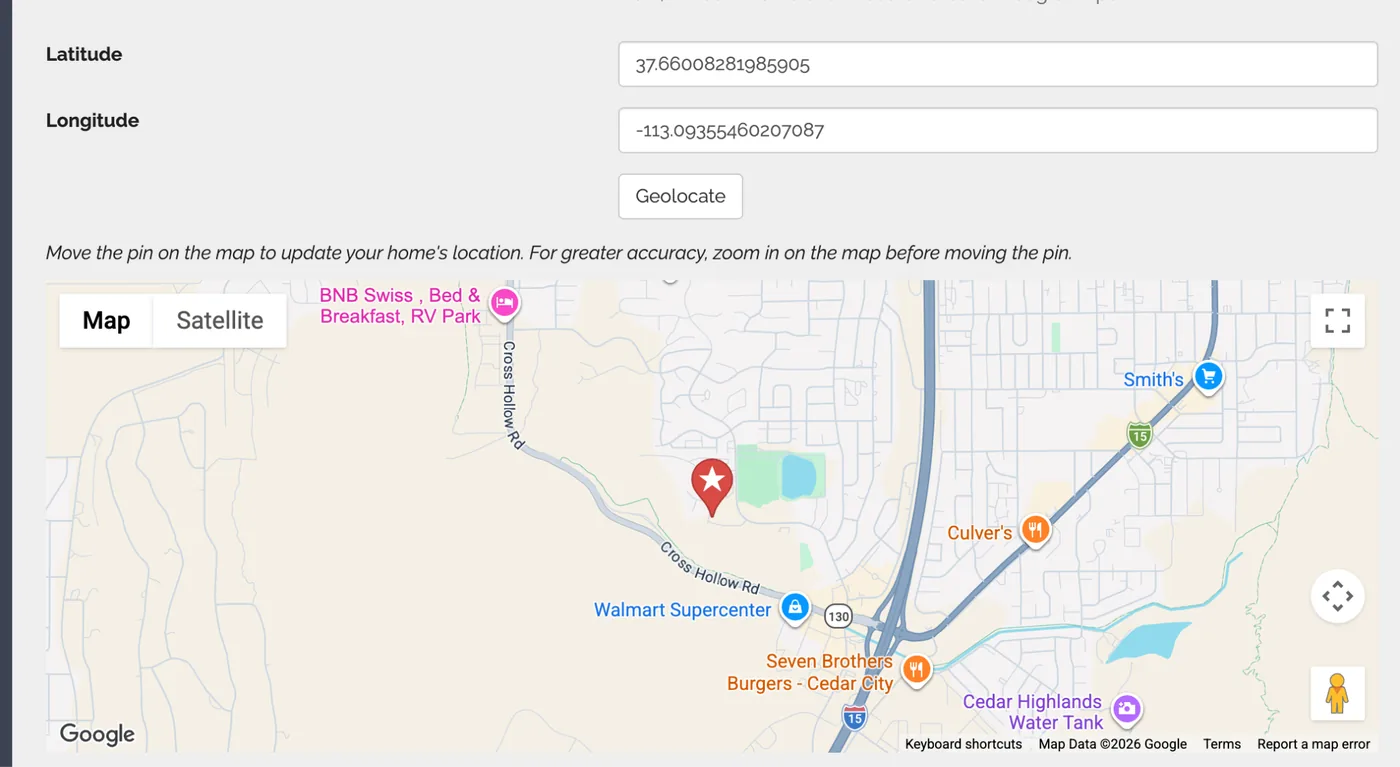
<li>Do <strong>not</strong> press the Geolocate button — just paste your numbers, scroll to the bottom of the page, and click Save. It will auto-update the map on the edit details page.</li>
<li>Save. The pin should move to the correct location.</li>
<li>Refresh the page to confirm the coordinates saved.</li>
</ol>
<p><img src="/assets/img/blog/paradesmart-builder-setup-guide--map-pin-updated-location.webp" alt="Google map showing the home's pin correctly updated to the new saved location"></p>
<p><strong>Good to know:</strong> The website map updates instantly, but the app map can take up to 24 hours to show your new pin location. Don’t worry if it doesn’t move right away.</p>
<h2 id="google-maps-and-apple-maps-destination-fields" tabindex="-1">Google Maps and Apple Maps Destination Fields</h2>
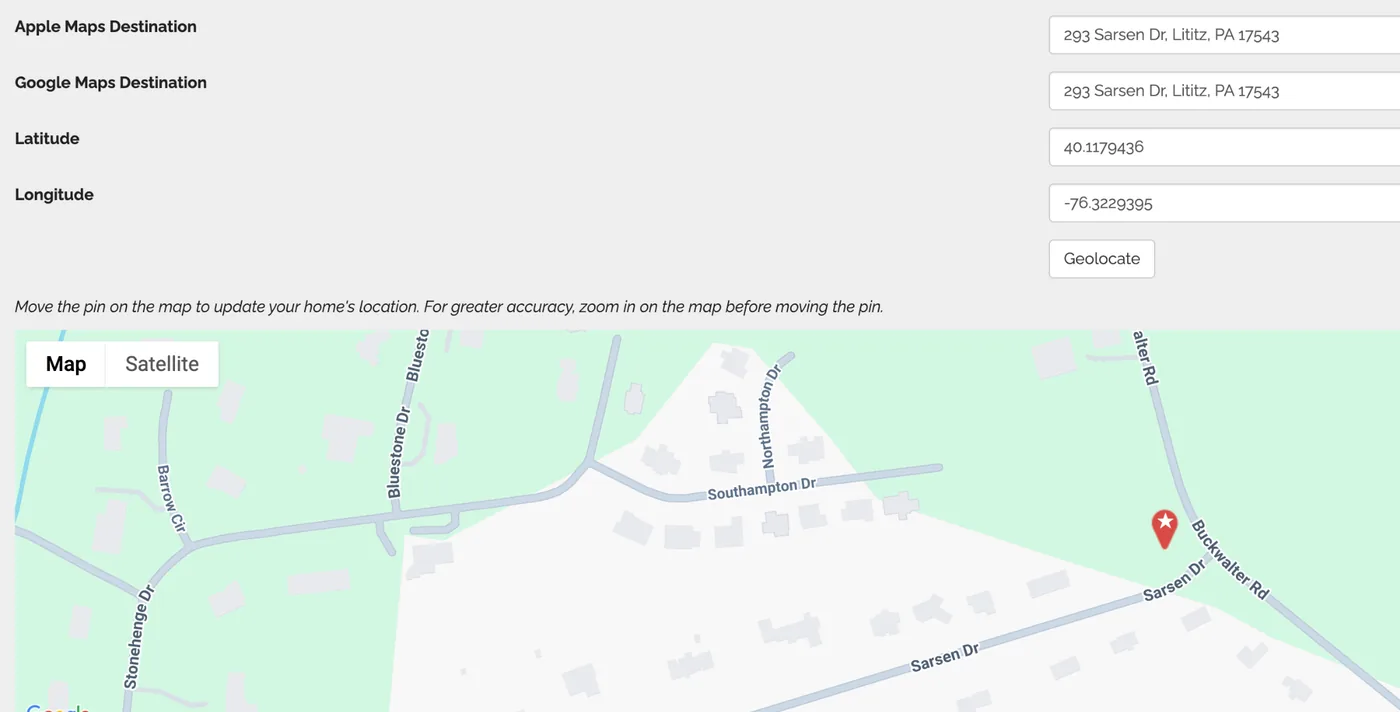
<p>These two optional fields control where visitors are sent when they tap the “Directions” button in the app. They’re a backup for when a home’s GPS coordinates aren’t recognized correctly by Apple or Google Maps — which happens often with brand-new roads and developments.</p>
<p>Enter a plain street address only, like <em>21524 Riva Ridge, Tyler TX 75704</em>. <strong>Do not enter a website URL or a Google Maps share link</strong> — these fields need a typed-out address that the map apps can recognize, nothing else.</p>
<p><img src="/assets/img/blog/paradesmart-builder-setup-guide--apple-google-maps-destination-fields.webp" alt="Apple Maps Destination and Google Maps Destination fields with a plain street address entered, shown above the Latitude, Longitude, and map preview"></p>
<p><strong>How it works:</strong></p>
<ul>
<li>If a Google or Apple destination address is entered, the app tries that address first when a visitor taps Directions.</li>
<li>If the address can’t be resolved, the app falls back to the GPS coordinates.</li>
<li>If these fields are left blank, the app always uses the GPS coordinates.</li>
</ul>
<p><strong>Our recommendations:</strong></p>
<ol>
<li>Always enter GPS coordinates first — that’s the most accurate and reliable method.</li>
<li>Only use these address fields if the home is new or hard to find on maps, or if you see inaccurate directions while testing.</li>
<li>Test on both an iPhone and an Android device. Apple Maps and Google Maps can behave differently.</li>
</ol>
<p><strong>If directions still send people the wrong way:</strong> digital maps sometimes just don’t know about new roads yet. Move your pin to the closest established street, explain the last steps in the Written Directions field, and add signage on event days to guide visitors the rest of the way.</p>
<h2 id="video-tour-youtube-or-vimeo" tabindex="-1">Video Tour (YouTube or Vimeo)</h2>
<p>This field needs the link to your video itself — <strong>not your company website and not the page the video lives on</strong>. A regular website URL will not play in the app.</p>
<p><strong>YouTube</strong></p>
<ol>
<li>Open your video on YouTube</li>
<li>Click Share below the video</li>
<li>Copy the short link that appears (it looks like <em><a href="https://youtu.be/abc123">https://youtu.be/abc123</a></em>)</li>
<li>Paste it into the Video Tour field</li>
</ol>
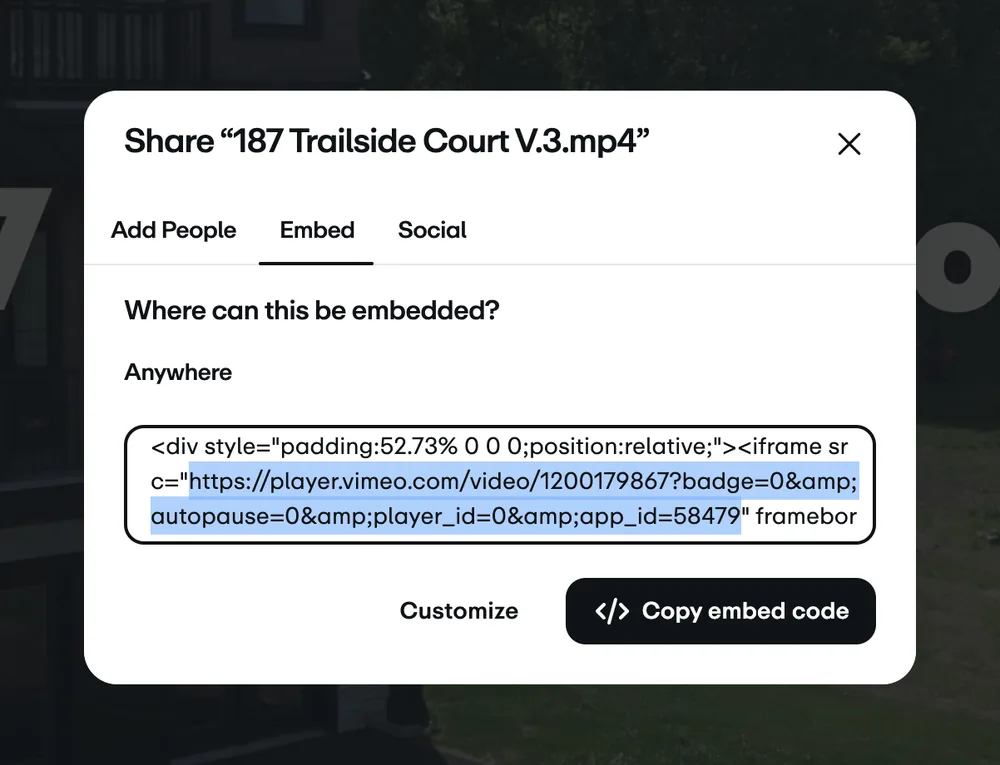
<p><strong>Vimeo</strong></p>
<ol>
<li>Open your video on Vimeo and click the Share button</li>
<li>In the share window, look at the Embed section — not the regular link at the top</li>
<li>Inside the embed code, find the URL that starts with <em><a href="https://player.vimeo.com/video/%E2%80%A6">https://player.vimeo.com/video/…</a></em> and copy just that link</li>
<li>Paste it into the Video Tour field</li>
</ol>
<p><img src="/assets/img/blog/paradesmart-builder-setup-guide--vimeo-share-embed-code.webp" alt="Vimeo share dialog with the Embed tab open and the player.vimeo.com URL highlighted inside the embed code"></p>
<p><strong>Working with a videographer?</strong> Make sure they set the video’s share settings so it’s embeddable on a website and inside an app. Private or restricted videos will show up as a blank box for visitors.</p>
<h2 id="360-virtual-tour-matterport" tabindex="-1">360 Virtual Tour (Matterport)</h2>
<ol>
<li>Open your tour on Matterport</li>
<li>Click the Share option for the tour</li>
<li>Copy the share link (it looks like <em><a href="https://my.matterport.com/show/?m=abc123">https://my.matterport.com/show/?m=abc123</a></em>)</li>
<li>Paste it into the 360 Virtual Tour field</li>
</ol>
<p><strong>Tip:</strong> Make sure the Matterport tour’s privacy setting allows public link sharing. If the tour is set to private, visitors won’t be able to view it.</p>
<h2 id="before-you-finish-quick-checklist" tabindex="-1">Before You Finish: Quick Checklist</h2>
<ul>
<li>Preview your home listing to make sure everything looks right</li>
<li>Check your home’s pin on the map and tap Directions to confirm it routes correctly</li>
<li>Play your video tour and 360 tour to confirm they load</li>
<li>Double-check your primary image — if you see a “Coming Soon” placeholder, your image didn’t upload</li>
<li>Confirm your builder profile shows your logo and About section</li>
</ul>
<p>Questions? Reach out to your parade organizer first, since they manage your event. For anything specific to the ParadeSmart platform, you can also visit our <a href="https://paradesmart.com/help-getting-started/"><strong>Getting Started guide</strong></a> in the Help Center.</p>
]]></content>
    <category term="ParadeSmart How-Tos"/>
  </entry>
  
  <entry>
    <title>Why Your HBA Should Keep 100% of Parade Ticket and Ad Revenue</title>
    <link href="https://paradesmart.com/blog/hba-keep-100-percent-parade-revenue/"/>
    <updated>2026-07-14T00:00:00Z</updated>
    <id>https://paradesmart.com/blog/hba-keep-100-percent-parade-revenue/</id>
    <summary>Most HBAs do not realize how much revenue a percentage-based ticketing platform costs them each year. Here is the math — and a better model.</summary>
    <content type="html"><![CDATA[<p>When an HBA chooses a ticketing platform, the percentage fee rarely feels significant in the moment. Three percent. Five percent. “It is just a small processing fee.”</p>
<p>It is not small.</p>
<h2 id="the-real-cost-of-percentage-based-ticketing" tabindex="-1">The real cost of percentage-based ticketing</h2>
<p>Let’s use real numbers. The Southern Utah Parade of Homes draws over 40,000 attendees. At $25 per ticket, that is $1,000,000 in gross ticket revenue.</p>
<p>A platform charging 3% takes $30,000 of that.
A platform charging 5% takes $50,000 of that.
A platform charging 6% takes $60,000 of that.</p>
<p>Every year.</p>
<p>That money does not go to your association’s mission. It does not fund builder support, member services, or community programs. It goes to a platform vendor who was not involved in planning the event, managing the venue, coordinating the builders, or supporting your staff on event day.</p>
<hr>
<h2 id="the-percentage-model-is-not-designed-for-your-event" tabindex="-1">The percentage model is not designed for your event</h2>
<p>Platforms like Eventbrite were designed for general consumer events — concerts, conferences, community gatherings. Their percentage model makes sense when the platform itself brings ticket buyers to your event through their marketplace, discovery algorithms, and email lists.</p>
<p>That is not what happens with a Parade of Homes. Your attendees come from your HBA’s marketing, your builders’ networks, your local media coverage, your social posts, and years of community trust. The ticketing platform did not bring them. You did.</p>
<p>A Parade of Homes is a closed, community event with its own organic demand. Paying a percentage for that demand makes no more sense than paying a percentage of your grocery bill to the bag boy.</p>
<hr>
<h2 id="what-a-flat-annual-fee-looks-like-by-comparison" tabindex="-1">What a flat annual fee looks like by comparison</h2>
<p>ParadeSmart charges a flat annual fee — not a percentage. The fee covers the full platform: the app, the website, ticketing, maps, voting, analytics, builder profiles, advertising, and support.</p>
<p>The math at a mid-sized parade — say, 8,000 tickets at $20 each — looks like this:</p>
<table>
<thead>
<tr>
<th>Model</th>
<th>Revenue</th>
<th>Platform fee</th>
<th>HBA keeps</th>
</tr>
</thead>
<tbody>
<tr>
<td>3% percentage</td>
<td>$160,000</td>
<td>$4,800</td>
<td>$155,200</td>
</tr>
<tr>
<td>5% percentage</td>
<td>$160,000</td>
<td>$8,000</td>
<td>$152,000</td>
</tr>
<tr>
<td>ParadeSmart flat fee</td>
<td>$160,000</td>
<td>Fixed annual</td>
<td>$160,000 minus flat fee</td>
</tr>
</tbody>
</table>
<p>At the flat fee, the HBA keeps every dollar above that fixed cost. As the parade grows — more homes, more attendees, higher ticket prices — the platform cost stays the same. The HBA captures 100% of the upside.</p>
<hr>
<h2 id="advertising-revenue-works-the-same-way" tabindex="-1">Advertising revenue works the same way</h2>
<p>Most parade apps include sponsor advertising placements — banner ads, featured home sponsor slots, sponsored map layers. On a percentage-based model, those ad dollars may also be subject to platform fees depending on how the contract is structured.</p>
<p>With ParadeSmart, the HBA prices and sells its own advertising, collects payment directly, and keeps every dollar. The platform does not take a cut of advertising revenue. Your sponsorship packages, your relationships with local businesses, your pricing decisions — those all stay yours.</p>
<hr>
<h2 id="the-question-to-ask-when-evaluating-any-platform" tabindex="-1">The question to ask when evaluating any platform</h2>
<p>Before signing with any ticketing or event technology vendor, ask this question directly:</p>
<p><strong>“If we sell $500,000 in tickets and advertising through your platform, how much will we keep?”</strong></p>
<p>The answer to that question is the most important number in the conversation. Feature lists, app design, and support quality all matter — but they matter less if the financial model takes a meaningful percentage of your association’s revenue every year, permanently.</p>
<p>Your parade took years to build. The attendance, the community trust, the builder relationships, the media coverage — that is your HBA’s work. The platform you choose should support that work, not take a percentage of it.</p>
<hr>
<p>To see how ParadeSmart’s pricing works for your parade size and ticket volume, <a href="/request-a-demo.html">reach out for a demo</a>. We are happy to walk through the numbers with you.</p>
]]></content>
    <category term="Ticketing &amp; Scanning"/>
  </entry>
  
  <entry>
    <title>5 Things HBA Parade Coordinators Wish They Knew Before Their First App</title>
    <link href="https://paradesmart.com/blog/five-things-parade-coordinators-wish-they-knew/"/>
    <updated>2026-07-06T00:00:00Z</updated>
    <id>https://paradesmart.com/blog/five-things-parade-coordinators-wish-they-knew/</id>
    <summary>Hard-won lessons from 13+ years supporting Parade of Homes events across 50+ HBAs — for coordinators managing their first or fifth parade.</summary>
    <content type="html"><![CDATA[<p>Running a Parade of Homes is one of the most complex events an HBA can produce. Over 13 years and 50+ associations, we have seen the same hard lessons learned again and again — usually in the week before opening day. Here are five things coordinators consistently say they wish they had known sooner.</p>
<h2 id="1-get-your-gps-coordinates-before-you-build-the-app" tabindex="-1">1. Get your GPS coordinates before you build the app</h2>
<p>Every home in your parade needs a GPS coordinate to appear as a pin on the map. It sounds simple. It is not.</p>
<p>Builders submit their home addresses. Addresses do not always geocode correctly — new construction developments often do not appear in Google Maps, addresses are listed under the builder’s office rather than the home site, or the coordinate points to the street rather than the driveway. By the time attendees are navigating to a home on parade day, a wrong coordinate sends them to the wrong house.</p>
<p><strong>What to do:</strong> Create a coordinate collection process at least six weeks before your app goes live. Ask builders to drop a pin directly on their lot using Google Maps and submit the latitude and longitude. Give them a one-page instruction sheet. This single step prevents more parade-day problems than almost anything else.</p>
<hr>
<h2 id="2-scanning-setup-is-a-thirty-minute-job-but-only-if-you-plan-it" tabindex="-1">2. Scanning setup is a thirty-minute job — but only if you plan it</h2>
<p>Ticket scanning does not require dedicated hardware. Volunteers scan using the app on any smartphone. But walking into opening day with no plan for how volunteers will access the scanning function wastes those first critical minutes at the door.</p>
<p><strong>What to do:</strong> Create a scanning guide for volunteers before parade day. It should cover: how to log in, how to access the scan screen, what to do if a ticket fails to scan, and who to call if there is a problem. Run a ten-minute walkthrough with your scanning team the day before. The coordinators who do this have smooth openings. The ones who skip it spend the first hour at the door troubleshooting on the fly.</p>
<hr>
<h2 id="3-peoples-choice-voting-drives-more-home-visits-than-anything-else" tabindex="-1">3. People’s Choice voting drives more home visits than anything else</h2>
<p>Associations that set up People’s Choice voting see attendance patterns that are consistently different from those that do not. Attendees visit more homes, stay longer, and return on later days of a multi-day parade specifically because they have not yet voted on a category they care about.</p>
<p>The most successful implementations give attendees a reason to visit homes they might otherwise skip: “Best Kitchen,” “Best Outdoor Living,” and “Most Innovative Use of Space” pull visitors into home types they would have passed by on a list-browsing basis alone.</p>
<p><strong>What to do:</strong> Create at least four voting categories. Post the categories prominently before the parade opens so attendees plan their route around them. Make sure every home in the parade is eligible for at least one category.</p>
<hr>
<h2 id="4-your-analytics-dashboard-tells-you-things-builders-will-pay-for" tabindex="-1">4. Your analytics dashboard tells you things builders will pay for</h2>
<p>Most HBA coordinators use the analytics dashboard to confirm ticket sales totals and scan counts. That is about 20% of what it can do.</p>
<p>The data coordinators consistently underuse: per-home scan counts (which builder got the most visits), time-of-day traffic patterns (which sessions are actually attended by serious buyers vs. casual browsers), and demographic data from ticket purchases (zip codes, age ranges, how far attendees traveled).</p>
<p>This information is valuable to builders. It is the kind of data that turns your post-parade report from a simple summary into a document builders read carefully — and cite when deciding whether to enter next year.</p>
<p><strong>What to do:</strong> Export the per-home scan report and share it with each builder individually after the parade, not just in aggregate. Include a brief note about how their home performed relative to the parade average. Builders who see real data about their home’s performance become stronger advocates for the event.</p>
<hr>
<h2 id="5-the-best-time-to-plan-next-years-parade-is-three-weeks-after-this-one" tabindex="-1">5. The best time to plan next year’s parade is three weeks after this one</h2>
<p>Three weeks after the parade closes, everything is still fresh. Coordinators remember what worked, what did not, and what they would change. Builders have just seen their results. Attendees are still talking about the homes they toured.</p>
<p>By December, that institutional knowledge has faded. By February, the coordinator who ran the event may have changed roles. By the time next year’s planning starts, the specific lessons from this year are gone — replaced by vague recollections and the same problems getting solved again from scratch.</p>
<p><strong>What to do:</strong> Block two hours three weeks after the parade closes. Sit down with the data, your notes, and your scanning team lead. Write a one-page “what we would change” document. Put it in the same folder as your setup forms for next year. Future you will be grateful.</p>
<hr>
<p>ParadeSmart’s support team works with coordinators at every stage of the planning process — from setup forms to event day to post-parade reporting. If you have questions about any of these steps, <a href="/request-a-demo.html">reach out any time</a>.</p>
]]></content>
    <category term="Parade Planning"/>
  </entry>
  
  <entry>
    <title>New Dashboard Update: Manage Your Own Parade Settings in ParadeSmart</title>
    <link href="https://paradesmart.com/blog/paradesmart-manage-parade-settings-dashboard/"/>
    <updated>2026-05-07T00:00:00Z</updated>
    <id>https://paradesmart.com/blog/paradesmart-manage-parade-settings-dashboard/</id>
    <summary>ParadeSmart clients can now manage parade settings directly in the dashboard, including plottable dates, voting settings, logos, and more.</summary>
    <content type="html"><![CDATA[<h3 id="were-excited-to-announce-a-major-update-to-the-paradesmart-dashboard-clients-can-now-manage-their-own-parade-settings-directly-inside-the-dashboard" tabindex="-1">We’re excited to announce a major update to the ParadeSmart Dashboard — clients can now manage their own parade settings directly inside the dashboard.</h3>
<p>This update gives organizers more flexibility, faster control, and the ability to make adjustments instantly without needing to contact our team for manual updates.</p>
<p><img src="/assets/img/blog/paradesmart-manage-parade-settings-dashboard--paradesmart-blog-preview-image-1-scaled.webp" alt="How to adjust your event parade settings tutorial photo"></p>
<h2 id="what-can-be-updated" tabindex="-1">What Can Be Updated?</h2>
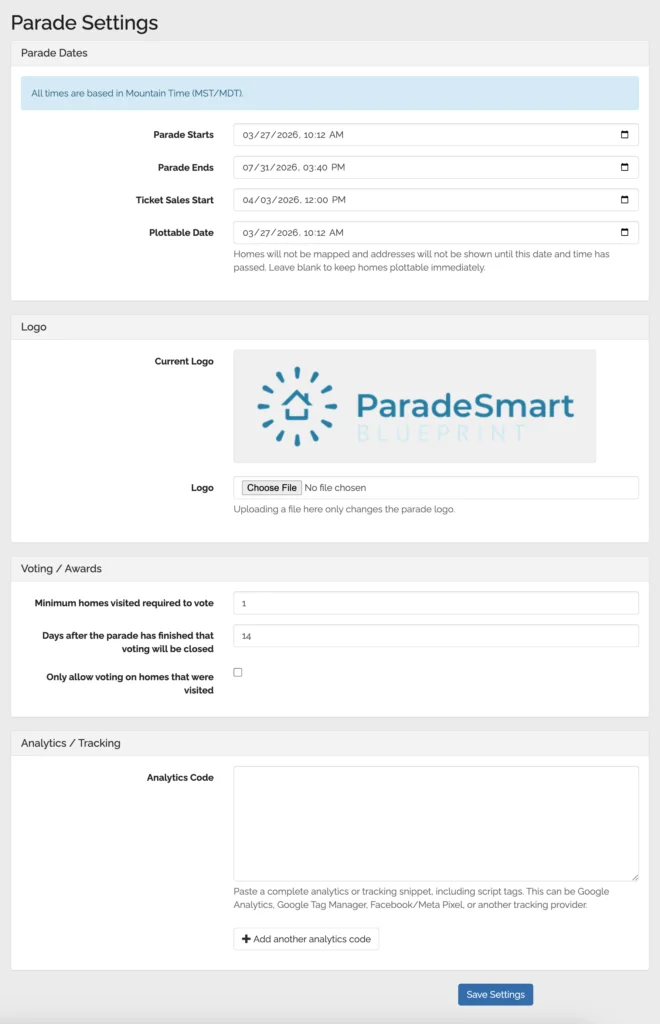
<p>Clients can now adjust important parade settings including:</p>
<ul>
<li>Parade start and end dates</li>
<li>Ticket sales start dates</li>
<li>Plottable dates</li>
<li>Voting and awards settings</li>
<li>Parade logos</li>
<li>Website analytics and tracking codes (If you use ParadeSmart for your event’s website)</li>
</ul>
<p>One of the biggest improvements is the ability to manage the <strong>Plottable Date</strong> directly.</p>
<p>Clients can also now add their own website analytics and tracking codes directly within the dashboard, including tools like <strong>Google Analytics</strong> and <strong>Meta Pixel</strong>.</p>
<p><img src="/assets/img/blog/paradesmart-manage-parade-settings-dashboard--dashboard-screenshot-1.webp" alt="ParadeSmart parade settings dashboard"></p>
<h2 id="how-to-access-parade-settings" tabindex="-1">How to Access Parade Settings</h2>
<p>Making adjustments is simple.</p>
<p>In the dashboard sidebar, click on <strong>Parade Settings</strong>. From there, you’ll find all adjustable parade settings in one place, including parade dates, ticket sale dates, plottable dates, voting settings, and more.</p>
<p>A few things to keep in mind:</p>
<ul>
<li>All times are based on <strong>Mountain Time (MST/MDT)</strong> since our servers are located in Utah.</li>
<li>Changes are not applied automatically — be sure to click <strong>Save</strong> once you’ve finished making your adjustments.</li>
</ul>
<p>This update makes it easier than ever to manage and test your parade setup on your own schedule.</p>
<h2 id="why-this-is-a-big-deal" tabindex="-1">Why This Is a Big Deal</h2>
<p>Previously, if a client wanted to change when addresses became visible, they needed to reach out to our team so we could make those changes behind the scenes.</p>
<p>Now, clients can control that process themselves in real time!</p>
<p>Need to test your map setup before homes officially go live? Simply adjust the Plottable Date, preview and test your map experience, then change it back when you’re finished.</p>
<p>This gives organizers much more freedom during setup and helps reduce delays when preparing for launch.</p>
<h2 id="more-flexibility-less-waiting" tabindex="-1">More Flexibility, Less Waiting</h2>
<p>We know parade timelines can change quickly, especially leading up to launch day. Giving clients direct access to these settings means:</p>
<ul>
<li>Faster updates</li>
<li>More independence</li>
<li>Easier testing and troubleshooting</li>
<li>Less back-and-forth communication</li>
<li>Better control over your parade experience</li>
<li>Direct access to analytics and marketing integrations</li>
</ul>
<p>As always, our team is still here to help whenever needed, but we’re excited to put more tools directly into our clients’ hands.</p>
<p>More ParadeSmart Dashboard improvements are on the way!</p>
]]></content>
    <category term="ParadeSmart How-Tos"/>
  </entry>
  
  <entry>
    <title>How to Set Up Voting and People&#39;s Choice Awards in ParadeSmart</title>
    <link href="https://paradesmart.com/blog/how-to-set-up-voting-and-peoples-choice-awards-in-paradesmart/"/>
    <updated>2026-03-23T00:00:00Z</updated>
    <id>https://paradesmart.com/blog/how-to-set-up-voting-and-peoples-choice-awards-in-paradesmart/</id>
    <summary>Learn how to set up People&#39;s Choice voting for your Parade of Homes event, including categories, restrictions, and adding voting to your app.</summary>
    <content type="html"><![CDATA[<p>Setting up People’s Choice voting for your Parade of Homes is one of the most engaging features you can add to your event. Whether you keep it simple with a single category or build out a full awards program, voting gives attendees a reason to stay engaged and gives builders something to celebrate at the end of the event.</p>
<p>If you have ticketing with ParadeSmart, voting is already available to you. Here’s how it works and how to get it set up.</p>
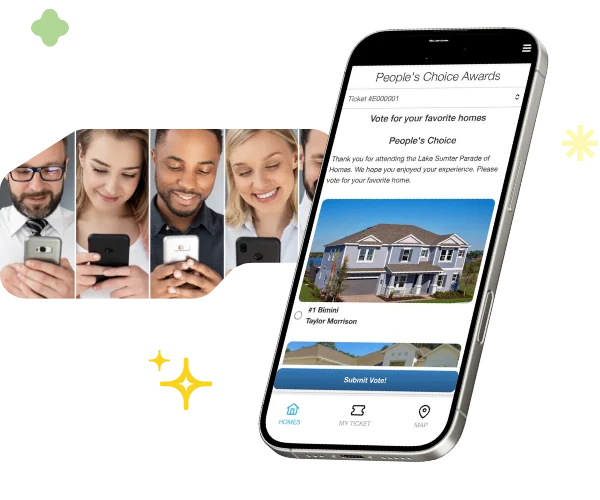
<p><img src="/assets/img/blog/how-to-set-up-voting-and-peoples-choice-awards-in-paradesmart--paradesmart-voting-graphic.webp" alt="ParadeSmart Voting"></p>
<h2 id="why-add-voting-to-your-event" tabindex="-1">Why Add Voting to Your Event?</h2>
<p>Voting creates a fun, competitive element that keeps visitors invested in the homes they tour. Builders love it because it gives recognition beyond just foot traffic. HBAs love it because it drives engagement and gives attendees something to talk about. It’s a small addition that adds a lot of energy to your event.</p>
<h2 id="step-1-let-paradesmart-know-you-want-voting" tabindex="-1">Step 1: Let ParadeSmart Know You Want Voting</h2>
<p>Before you can configure People’s Choice voting in your Parade of Homes manager, reach out to the ParadeSmart team to get it enabled.</p>
<p>When you do, let us know your preferences for the following voting restrictions:</p>
<ul>
<li>Minimum number of homes a visitor must visit before they can vote</li>
<li>Whether visitors can only vote for homes they personally visited</li>
<li>How many days after the event closes that voting will remain open</li>
</ul>
<p>These settings help you run a fair, intentional voting experience rather than a free-for-all.</p>
<h2 id="step-2-set-up-your-voting-categories" tabindex="-1">Step 2: Set Up Your Voting Categories</h2>
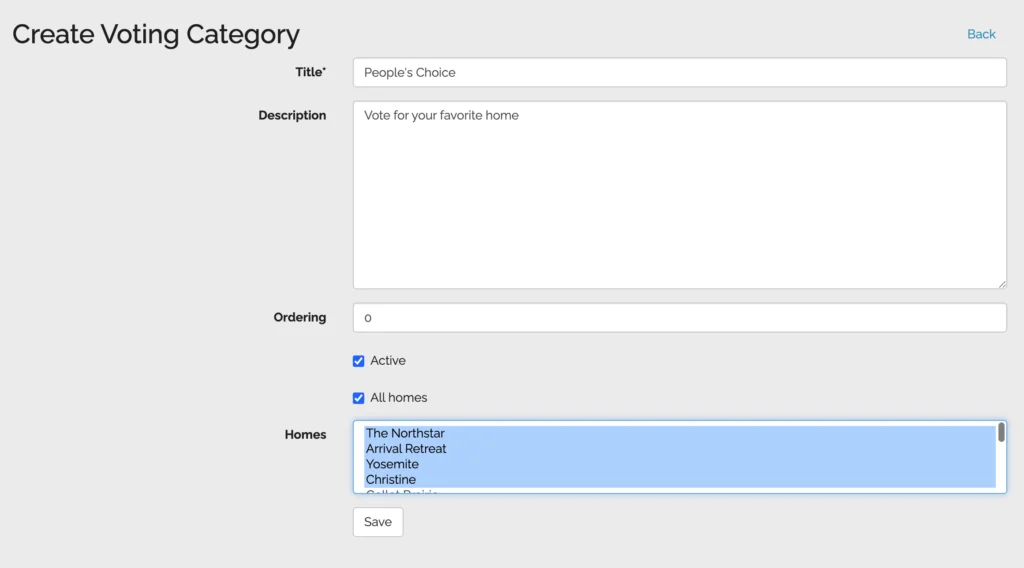
<p>Once voting is enabled, you can add your categories in the Web Manager.</p>
<ol>
<li>Go to <strong>Advanced</strong> in the left sidebar</li>
<li>Scroll down and click <strong>Voting Categories</strong></li>
<li>Click <strong>Create</strong> to add a new category</li>
<li>Fill in the category details:
<ul>
<li>Name your category, such as People’s Choice, Best Kitchen, Best Exterior Design, or Best Floor Plan</li>
<li>Add an optional description that will appear below the category on the voting page</li>
<li>Set the ordering to control which category appears first</li>
<li>Check or uncheck Active to control whether the category is currently visible to voters</li>
<li>Manually select the homes that are eligible to be voted on in that category</li>
</ul>
</li>
<li>Click <strong>Save</strong></li>
</ol>
<p><img src="/assets/img/blog/how-to-set-up-voting-and-peoples-choice-awards-in-paradesmart--set-up-voting-category.webp" alt="How to set up People's Choice voting category in ParadeSmart"></p>
<p><strong>Tip: Even though there is an “All Homes” checkbox in the category form, manually highlight the homes you want included. This ensures the right homes appear for each category.</strong></p>
<p><img src="/assets/img/blog/how-to-set-up-voting-and-peoples-choice-awards-in-paradesmart--voting-categories-web-manager.webp" alt="People's Choice voting categories in ParadeSmart Web Manager"></p>
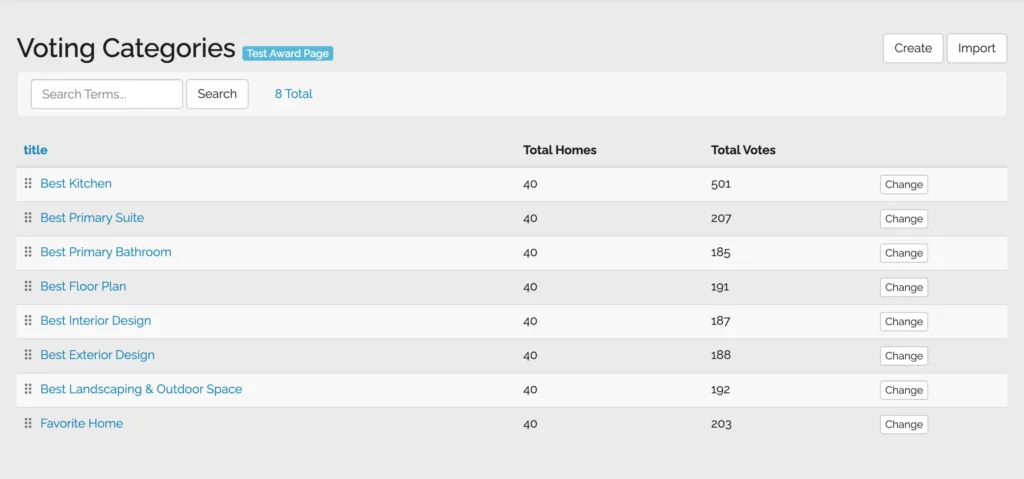
<p><strong>Tip: You can create as many categories as you want. Some events keep it simple with just one People’s Choice award. Others set up a full awards program with categories like Best Primary Suite, Best Landscaping, Best Interior Design, and more. There is no limit.</strong></p>
<h2 id="step-3-preview-your-voting-page" tabindex="-1">Step 3: Preview Your Voting Page</h2>
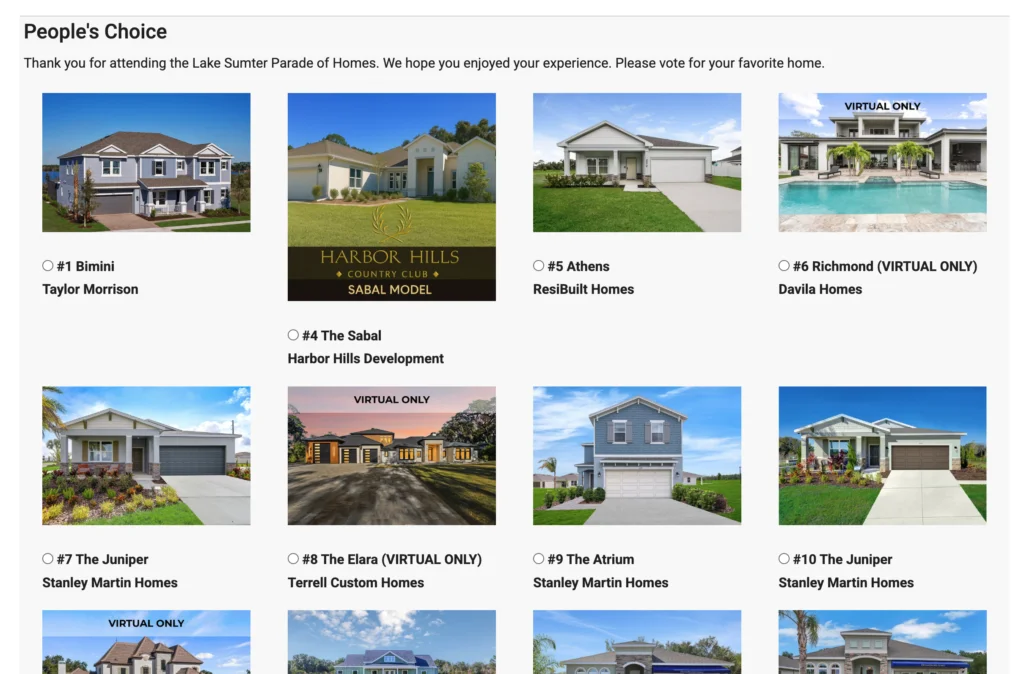
<p>Once your categories are saved, click the blue Test Award Page button at the top of the Voting Categories list. This lets you see exactly what visitors will see before the event goes live, so you can catch any issues early.</p>
<p><img src="/assets/img/blog/how-to-set-up-voting-and-peoples-choice-awards-in-paradesmart--voting-page-website.webp" alt="People's Choice voting page on Parade of Homes website"></p>
<h2 id="step-4-add-voting-to-your-app-and-website-menu" tabindex="-1">Step 4: Add Voting to Your App and Website Menu</h2>
<p>You can ask the ParadeSmart team to add a Vote or People’s Choice link to your app and website menu at any time. You can also share the voting page directly by adding /web/awards to the end of your event domain name.</p>
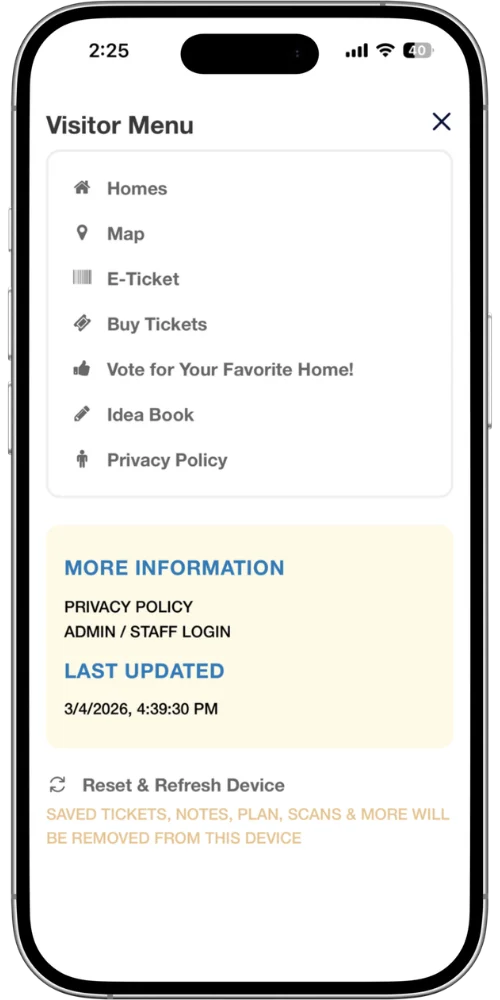
<p>If you’d like to add the voting menu item to your app yourself, here’s how:</p>
<ol>
<li>Go to <strong>Advanced</strong> in the sidebar</li>
<li>Click <strong>Parade Menu Items</strong></li>
<li>Click <strong>Create</strong></li>
<li>Enter <strong>#/vote</strong> as the URL</li>
<li>Set the venue to <strong>Mobile App</strong></li>
<li>Add a name such as Vote or People’s Choice</li>
<li>Pick an icon</li>
<li>Click <strong>Save</strong></li>
</ol>
<p>The voting link will now appear in your app menu for attendees to find easily.</p>
<p><img src="/assets/img/blog/how-to-set-up-voting-and-peoples-choice-awards-in-paradesmart--add-voting-menu-item.webp" alt="Adding voting menu item to Parade of Homes app">
<img src="/assets/img/blog/how-to-set-up-voting-and-peoples-choice-awards-in-paradesmart--app-menu-with-voting.webp" alt="Preview of hamburger menu of ParadeSmart mobile app after adding voting"></p>
<h2 id="step-5-add-a-thank-you-page-after-voting-optional" tabindex="-1">Step 5: Add a Thank You Page After Voting (Optional)</h2>
<p>If you want to leave visitors with a nice moment after they submit their vote, you can create a custom thank you page. This is a great place to feature your People’s Choice sponsor, add a message of appreciation, or share event details.</p>
<p>To set it up, go to <strong>App and Web Content</strong> in the manager, create a new page with the slug /awards/success/, and add whatever content you’d like. ParadeSmart will automatically show this page to visitors right after they vote.</p>
<h2 id="how-visitors-cast-their-vote" tabindex="-1">How Visitors Cast Their Vote</h2>
<p>Visitors can vote through the app or on your event website. If a visitor already has their ticket registered in the E-Ticket section of the app, they can vote without any additional steps. If they have not registered their ticket yet, they will be prompted to do so before voting.</p>
<p>On the website, visitors register their ticket first and then access the voting page.</p>
<p><img src="/assets/img/blog/how-to-set-up-voting-and-peoples-choice-awards-in-paradesmart--peoples-choice-voting-mobile-app.webp" alt="People's Choice voting on Parade of Homes mobile app"></p>
<h2 id="viewing-your-results" tabindex="-1">Viewing Your Results</h2>
<p>You can check vote totals at any time during or after the event.</p>
<ol>
<li>Go to <strong>Advanced</strong> in the sidebar</li>
<li>Click <strong>Voting Categories</strong></li>
<li>Click the name of any category to see a graph of votes by home</li>
<li>Hover over any point on the graph to see the exact number of votes</li>
</ol>
<p>Only homes that received at least one vote will appear on the graph. If a home is not shown, it did not receive any votes during that period.</p>
<p><img src="/assets/img/blog/how-to-set-up-voting-and-peoples-choice-awards-in-paradesmart--voting-results-view.webp" alt="Viewing People's Choice voting results in ParadeSmart"></p>
<hr>
<h2 id="ready-to-add-voting-to-your-event" tabindex="-1">Ready to Add Voting to Your Event?</h2>
<p>If you are ready to add People’s Choice voting to your Parade of Homes event, email <strong><a href="mailto:support@paradesmart.com">support@paradesmart.com</a></strong> and we’ll get it enabled and walk you through any questions. If you’d like the full documentation, you can also find our complete voting guide in our resources.</p>
<p><img src="/assets/img/blog/how-to-set-up-voting-and-peoples-choice-awards-in-paradesmart--paradesmart-logo-horizontal-blue.webp" alt="ParadeSmart Logo"></p>
]]></content>
    <category term="Inside the ParadeSmart App"/>
  </entry>
  
  <entry>
    <title>Getting Started with ParadeSmart: How to Add Builders &amp; Homes</title>
    <link href="https://paradesmart.com/blog/getting-started-with-paradesmart-how-to-add-builders-homes/"/>
    <updated>2026-03-16T00:00:00Z</updated>
    <id>https://paradesmart.com/blog/getting-started-with-paradesmart-how-to-add-builders-homes/</id>
    <summary>Learning how to add builders and homes in ParadeSmart is one of the first things you&#39;ll do as a new client, and it&#39;s easier than you might think. This guide ...</summary>
    <content type="html"><![CDATA[<h3 id="a-step-by-step-guide-for-new-clients-and-returning-organizers-alike" tabindex="-1">A step-by-step guide for new clients and returning organizers alike</h3>
<p>Learning how to add builders and homes in ParadeSmart is one of the first things you’ll do as a new client, and it’s easier than you might think. This guide walks you through logging in, setting up your builders, connecting them to homes, and hiding content until you’re ready to go live.</p>
<p><img src="/assets/img/blog/getting-started-with-paradesmart-how-to-add-builders-homes--paradesmart-blog-preview-image-scaled.webp" alt="ParadeSmart blog preview image"></p>
<h2 id="step-1-log-into-the-dashboard" tabindex="-1">Step 1: Log Into the Dashboard</h2>
<p>Head to <a href="https://app.paradesmart.com/accounts/login/"><strong>https://app.paradesmart.com/accounts/login/</strong></a> and enter your username and password. The ParadeSmart team provides these when your account is set up. If you’re unsure of your credentials, reach out to <a href="mailto:support@paradesmart.com"><strong>support@paradesmart.com</strong></a> and we’ll get you squared away.</p>
<p><img src="/assets/img/blog/getting-started-with-paradesmart-how-to-add-builders-homes--dashboard-screenshot-1.webp" alt="ParadeSmart Web Manager dashboard"></p>
<p>Once you’re in, you’ll see a sidebar on the left with everything you need to manage your event.</p>
<p><img src="/assets/img/blog/getting-started-with-paradesmart-how-to-add-builders-homes--paradesmart-parade-of-homes.webp" alt="ParadeSmart Dashboard Manager View with event ticketing
"></p>
<p>This is a view of the ParadeSmart Dashboard with Ticketing Feature</p>
<h2 id="step-2-how-to-add-builders-in-paradesmart" tabindex="-1">Step 2: How to Add Builders in ParadeSmart</h2>
<p>This is the most important thing to know before you start: builders need to be in the system before you can add homes. Each home gets connected to a builder, so setting those up first saves you from having to go back and make edits later.</p>
<p>Here’s how to add a builder:</p>
<ol>
<li>Click <strong>Builders</strong> in the left sidebar</li>
<li>Next, click the <strong>Create</strong> button in the top right corner</li>
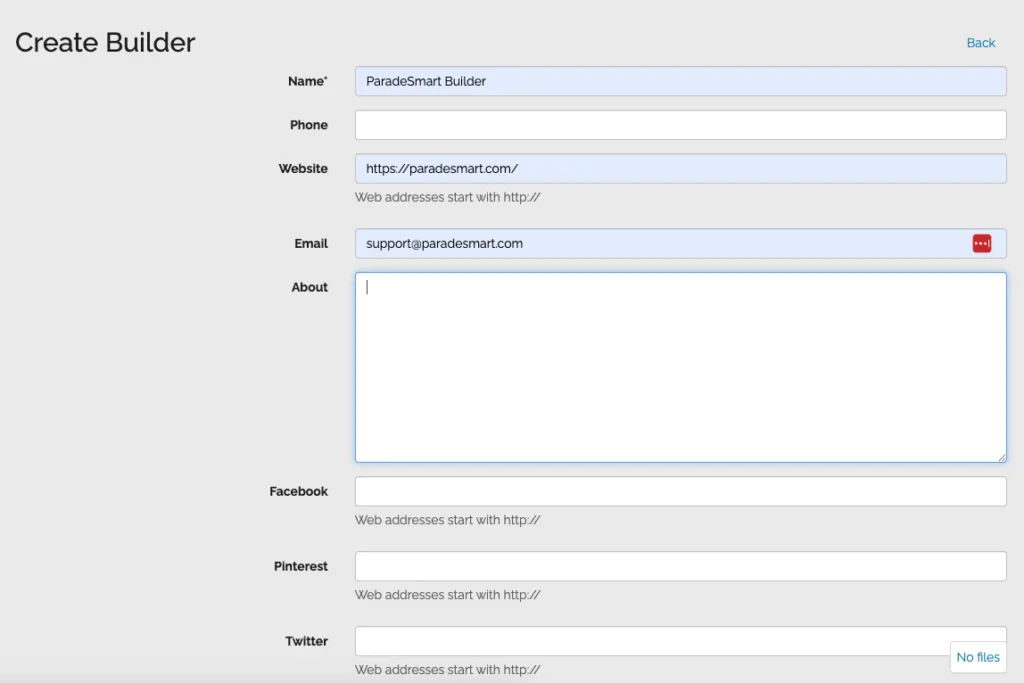
<li>Fill out the builder’s information, including their name and any profile details you have</li>
<li>If you want the builder to have their own login so they can scan tickets and manage their home during the event, set a simple password for them here</li>
<li>Scroll to the bottom and click <strong>Save</strong></li>
</ol>
<p><img src="/assets/img/blog/getting-started-with-paradesmart-how-to-add-builders-homes--builder-profile-fields.webp" alt="Screen showing some of the fields available for builders to fill out to create their profile"></p>
<p>Some of the fields available for builders to fill out to create their Builder Profile</p>
<p><strong>Tip: Builder logins are created automatically when you create a builder profile. You do not need to create a separate user for them. Just add a password and pass those credentials along to your builder when the time comes.</strong></p>
<p><strong>Tip: Builder profiles only show up in the app if you have an About section or a logo added. It does not need to be elaborate, but having at least one of those filled in makes a difference.</strong></p>
<h2 id="step-3-add-your-homes-and-connect-them-to-a-builder" tabindex="-1">Step 3: Add Your Homes and Connect Them to a Builder</h2>
<p>Once your builders are added, the next step in setting up ParadeSmart is creating your homes and linking them together.</p>
<p>Here’s how:</p>
<ol>
<li>Click <strong>Homes</strong> in the left sidebar</li>
<li>From there, click <strong>Create</strong> in the top right corner</li>
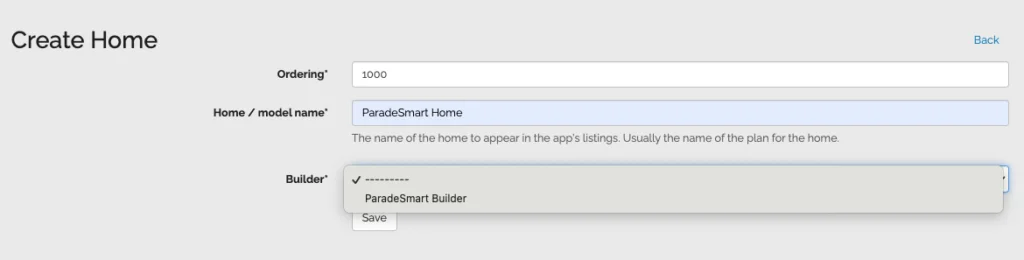
<li>Give the home a name and set the ordering (this controls where it appears in the list)</li>
<li>Connect the home to a builder using the builder field</li>
<li>Lastly, select <strong>Save</strong></li>
</ol>
<p><img src="/assets/img/blog/getting-started-with-paradesmart-how-to-add-builders-homes--create-home-connect-builder.webp" alt="first step to create a home and connect a builder account to it"></p>
<p>First step to create a Home and connect a Builder Account to their Home</p>
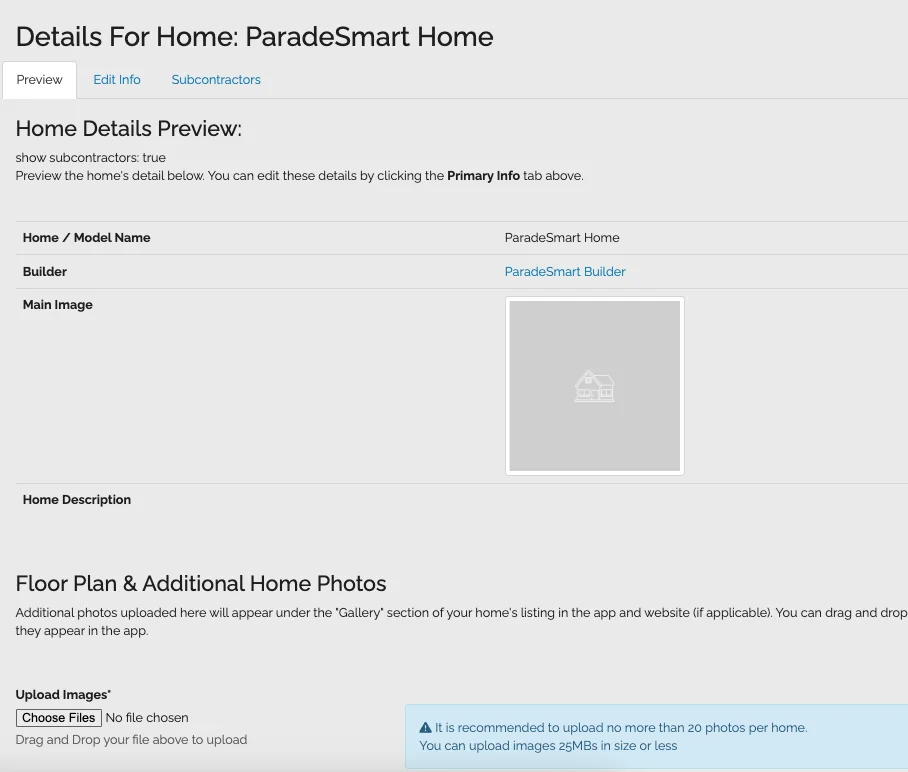
<p><img src="/assets/img/blog/getting-started-with-paradesmart-how-to-add-builders-homes--home-preview-after-creation.webp" alt="Preview of the Home once it has been created"></p>
<p>Preview of the Home once it has been created</p>
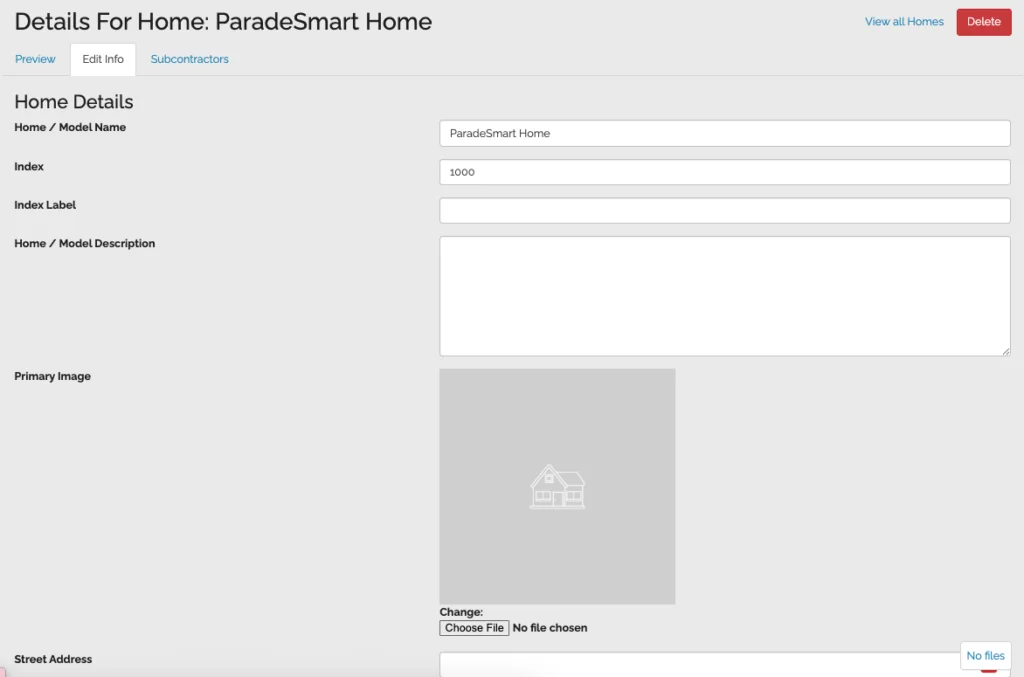
<p>After saving, you’ll land on the home’s full profile page. This is where you can add photos, a description, traits like square footage or bedroom count, and GPS coordinates for the map. Take your time filling these out, and remember to hit Save again after making any updates.</p>
<p><img src="/assets/img/blog/getting-started-with-paradesmart-how-to-add-builders-homes--edit-info-tab.webp" alt="Click the &quot;Edit Info&quot; tab at the top to begin editing the home information traits"></p>
<p>Click the “Edit Info” tab at the top to begin editing the home information traits</p>
<p><strong>Tip: You can go back and edit a home as many times as you need. You can change anything after saving.</strong></p>
<h2 id="step-4-hide-homes-until-youre-ready" tabindex="-1">Step 4: Hide Homes Until You’re Ready</h2>
<p>You do not have to make homes public right away. You can mark any home as hidden so it does not appear on your website or in the app until you’re ready to show it.</p>
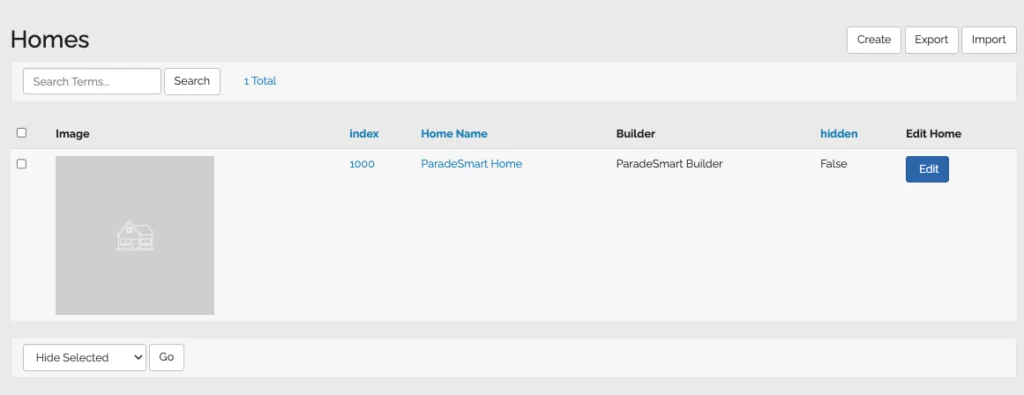
<p>To hide or unhide a home, go to the Homes tab in the sidebar. On the right side of each row, you’ll see a column labeled Hidden. If it says False, the home is visible. If it says True, it is hidden.</p>
<p>If you need to update several homes at once, you can check the boxes on the left side of the list, scroll to the bottom, and use the dropdown to hide or unhide all selected homes at the same time.</p>
<p>This is a great way to build out all your content in advance and then flip everything live when you’re ready for the public to see it.</p>
<p><img src="/assets/img/blog/getting-started-with-paradesmart-how-to-add-builders-homes--hide-show-home-toggle.webp" alt="Checkbox is on the left, dropdown will be at the bottom left of the home list, and to see if it's hidden/unhidden look to the right of each home entry."></p>
<p>Checkbox is on the left, dropdown will be at the bottom left of the home list, and to see if it’s hidden/unhidden look to the right of each home entry.</p>
<hr>
<h2 id="need-help-getting-started" tabindex="-1">Need Help Getting Started?</h2>
<p>If you have questions about how to add builders and homes in ParadeSmart, our team is always happy to help. You can also find video walkthroughs and additional guides in our <a href="https://docs.google.com/document/d/1kyG5Xjzmx1FaHsECp8sYFQ5whEM-W5IHYke5d8HJY9Y/edit?usp=sharing"><strong>General Information Manual</strong>.</a> Reach out anytime at <a href="mailto:support@paradesmart.com">support@paradesmart.com</a>.</p>
<p><img src="/assets/img/blog/getting-started-with-paradesmart-how-to-add-builders-homes--paradesmart-logo-horizontal-blue-soft.webp" alt="ParadeSmart logo horizontal blue soft"></p>
]]></content>
    <category term="ParadeSmart How-Tos"/>
  </entry>
  
  <entry>
    <title>ParadeSmart Advertising Guide: Placements, Sizes, and How to Set Up Ads</title>
    <link href="https://paradesmart.com/blog/paradesmart-advertising-guide/"/>
    <updated>2026-02-16T00:00:00Z</updated>
    <id>https://paradesmart.com/blog/paradesmart-advertising-guide/</id>
    <summary>ParadeSmart advertisements help showcase sponsors in your app and website. Learn ad sizes, placements, and setup steps.</summary>
    <content type="html"><![CDATA[<h3 id="paradesmart-advertisements-are-banner-ads-shown-in-your-paradesmart-website-andor-mobile-app-each-ad-includes-an-image-an-optional-click-link-and-one-or-more-placement-areas-so-you-can-control-exactly-where-sponsors-show-up" tabindex="-1"><strong>ParadeSmart advertisements</strong> are banner ads shown in your ParadeSmart website and/or mobile app. Each ad includes an image, an optional click link, and one or more placement areas, so you can control exactly where sponsors show up.</h3>
<p>One quick note: you set your own sponsor pricing and keep the ad revenue. ParadeSmart provides the tools, but we do not take a percentage of what you charge sponsors.</p>
<p><img src="/assets/img/blog/paradesmart-advertising-guide--advertisement-options-graphic.webp" alt="ParadeSmart advertisements options"></p>
<h2 id="what-ad-options-do-we-offer" tabindex="-1">What ad options do we offer?</h2>
<p>ParadeSmart ads are banner style images that can be clickable (or not) and can run across both website and app placements.</p>
<h3 id="ad-image-sizes-and-design-tips" tabindex="-1">Ad image sizes and design tips</h3>
<ul>
<li><strong>Standard banner size:</strong> <strong>1200px wide × 200px tall</strong></li>
<li>For app visibility, use <strong>bigger text and a simpler layout</strong> since small details get lost on mobile screens.</li>
<li>Pro tip: If you are running the same sponsor on both platforms, consider creating:
<ul>
<li>a more detailed version for the website</li>
<li>a cleaner, bold text version for the app</li>
</ul>
</li>
</ul>
<h3 id="paradesmart-advertisements-website-and-app-placements" tabindex="-1">ParadeSmart Advertisements: Website and app placements</h3>
<p>When you create an ad, you can select one or more “Areas” to control where it appears.</p>
<h4 id="website-areas" tabindex="-1">Website areas</h4>
<ul>
<li>Website Home Page</li>
<li>Homes list - Top (website only)</li>
<li>Homes list - Bottom (website only)</li>
<li>Static page - Top (website only)</li>
<li>Static page - Bottom (website only)</li>
<li>Home detail - Top (website only)</li>
<li>Home detail - Bottom (website only)</li>
</ul>
<h4 id="app-areas" tabindex="-1">App areas</h4>
<ul>
<li>App Header - Top (app only) (most visible location)</li>
<li>Homes list - Top (app only)</li>
<li>Homes list - Inbetween (app only)</li>
<li>Homes list - Bottom (app only)</li>
<li>Static page - Top (app only)</li>
<li>Static page - Bottom (app only)</li>
<li>Home detail - Top (app only)</li>
<li>Home detail - Bottom (app only)</li>
<li>Register ticket - Top</li>
</ul>
<p><strong>Note on “Homes list - Inbetween (app only)”</strong>: this shows between every 3 rows of homes in grid view, is not shown in gallery view, and requires at least 10 homes for it to appear.</p>
<h2 id="how-to-set-up-paradesmart-advertisements" tabindex="-1">How to set up ParadeSmart advertisements</h2>
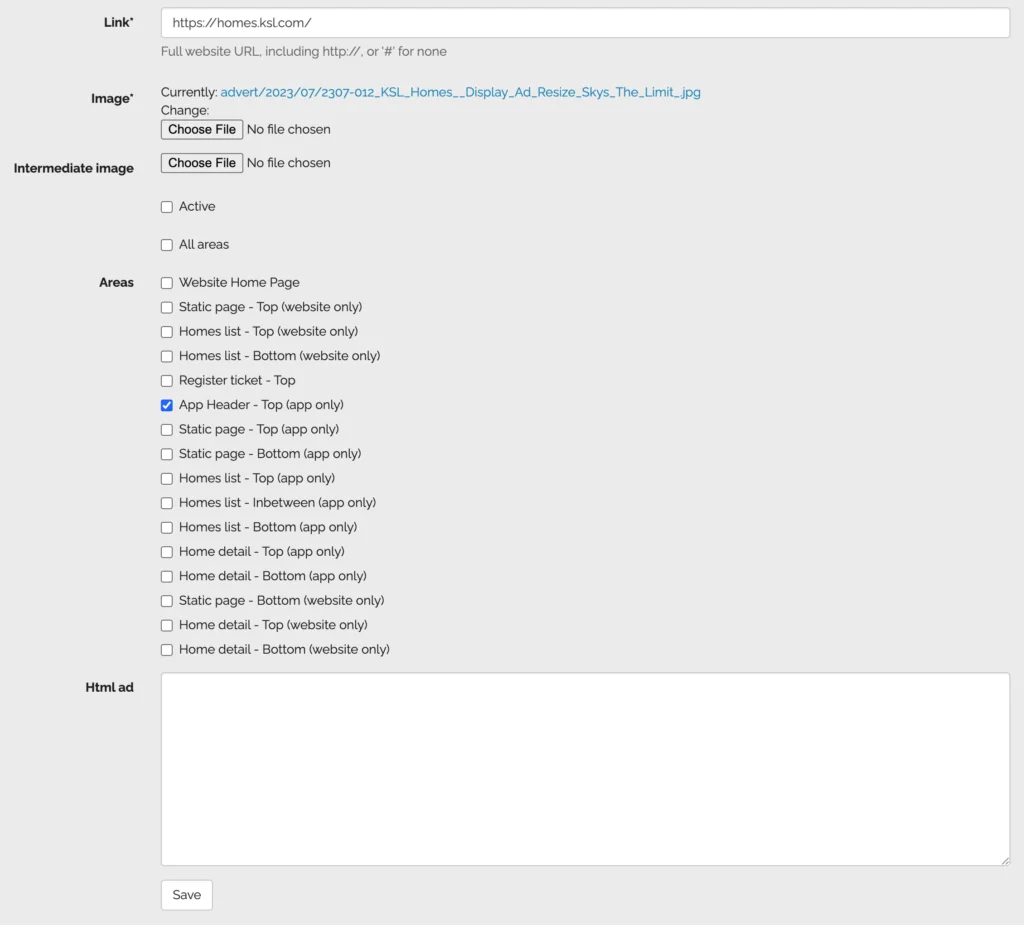
<ol>
<li>Go to <strong>Advertisements</strong> in the Web Manager.</li>
<li>Click <strong>Create</strong> (or select an existing advertisement to edit).</li>
<li>Set the <strong>Link</strong> (or use <strong>#</strong> for no link).</li>
<li>Upload your banner:
<ul>
<li><strong>Image</strong> (required)</li>
<li><strong>Intermediate image</strong> (optional, for a different app version)</li>
</ul>
</li>
<li>Check <strong>Active</strong> if it should display.</li>
<li>Select one or more <strong>Areas</strong> (placements).</li>
<li>Click <strong>Save</strong>.</li>
</ol>
<p><img src="/assets/img/blog/paradesmart-updates--set-up-advertisements-web-manager.webp" alt="How to set up ParadeSmart advertisements in the Web Manager"></p>
<h2 id="image-fields-explained-website-vs-app" tabindex="-1">Image fields explained (website vs app)</h2>
<ul>
<li><strong>Image</strong> = default ad image (used for website, and also works for app)</li>
<li><strong>Intermediate image</strong> = optional alternate image used for the mobile app (helpful when you want a design optimized for app viewing)</li>
</ul>
<h2 id="should-an-ad-be-clickable" tabindex="-1">Should an ad be clickable?</h2>
<ul>
<li>The <strong>Link</strong> field controls where the ad goes when clicked.</li>
<li>If you do not want it clickable, enter <strong>#</strong> in the Link field.</li>
</ul>
<h2 id="quick-admin-tip-double-check-placements-fast" tabindex="-1">Quick admin tip: double-check placements fast</h2>
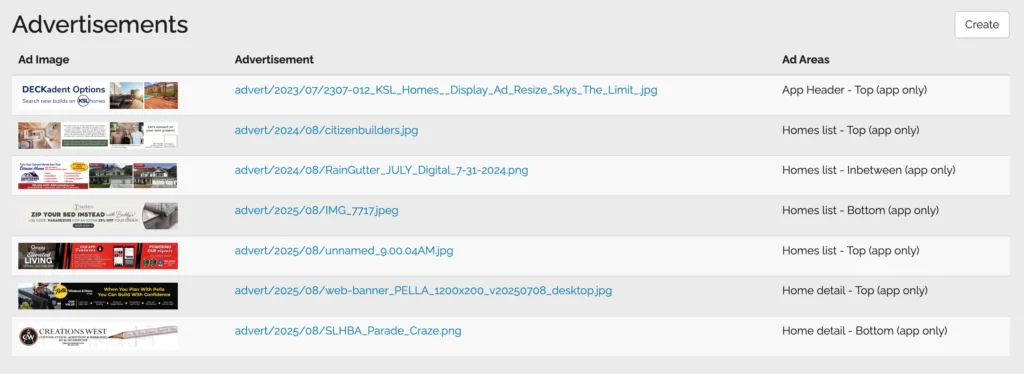
<p>In the advertisement list, you can see an ad image preview, the advertisement image URL, and the assigned ad areas.</p>
<p><img src="/assets/img/blog/paradesmart-advertising-guide--advertisements-quick-view.webp" alt="Advertisments Quick View ParadeSmart"></p>
<hr>
<h2 id="want-to-learn-more-about-advertisements" tabindex="-1">Want to learn more about advertisements?</h2>
<p>For a deeper walkthrough of ParadeSmart advertisements, see our documentation here: <strong><a href="https://docs.google.com/document/d/1kyG5Xjzmx1FaHsECp8sYFQ5whEM-W5IHYke5d8HJY9Y/edit?tab=t.0#bookmark=id.twi95gxt1q6y">General Information Manual (Advertisements)</a></strong>.</p>
<p>If you have additional questions, you can email us at <strong><a href="mailto:support@paradesmart.com">support@paradesmart.com</a></strong>.</p>
<p><img src="/assets/img/blog/sister-parade-of-homes--paradesmart-logo-horizontal-blue-soft.webp" alt="ParadeSmart Blue Logo"></p>
]]></content>
    <category term="ParadeSmart How-Tos"/>
  </entry>
  
  <entry>
    <title>ParadeSmart Updates: New Tools, Better Reporting, and Easier Setup</title>
    <link href="https://paradesmart.com/blog/paradesmart-updates/"/>
    <updated>2026-02-11T00:00:00Z</updated>
    <id>https://paradesmart.com/blog/paradesmart-updates/</id>
    <summary>ParadeSmart updates include improved reporting, ad placements, scannable ticket dates, kiosk scanning, updated imports, and new builder training tools.</summary>
    <content type="html"><![CDATA[<h3 id="paradesmart-updates-are-rolling-out-with-improvements-that-make-it-easier-to-run-your-event-train-your-teams-and-share-results-with-sponsors-heres-a-quick-roundup-of-whats-new-and-whats-coming" tabindex="-1"><strong>ParadeSmart updates</strong> are rolling out with improvements that make it easier to run your event, train your teams, and share results with sponsors. Here’s a quick roundup of what’s new (and what’s coming).</h3>
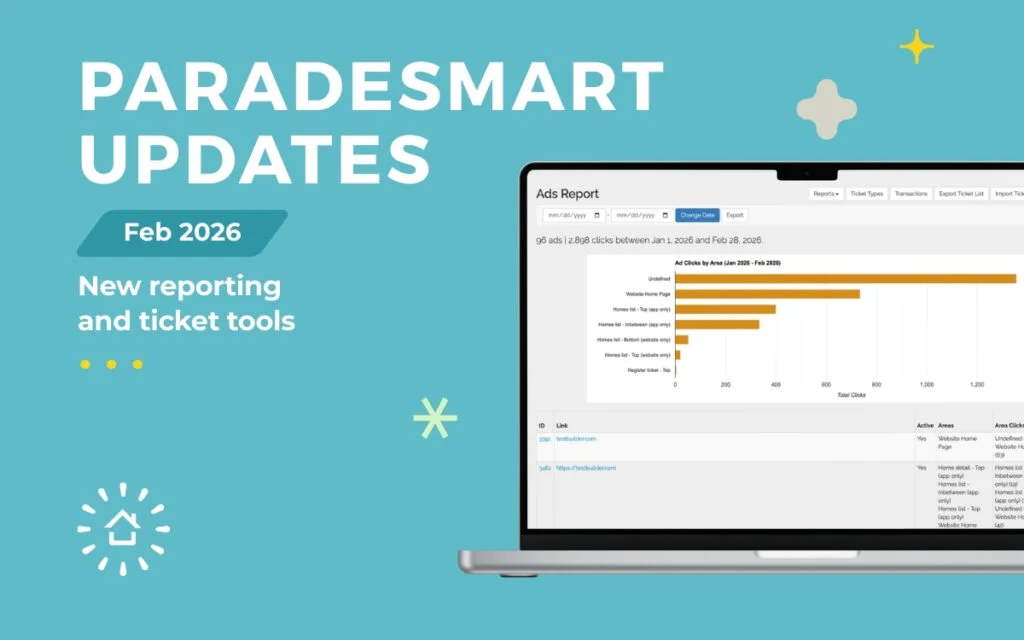
<p><img src="/assets/img/blog/paradesmart-updates--paradesmart-blog-preview-image-1-scaled.webp" alt="ParadeSmart Updates February 2026 cover photo"></p>
<h2 id="updated-improved-reporting-including-a-new-ads-report" tabindex="-1">UPDATED: Improved Reporting (Including a New Ads Report)</h2>
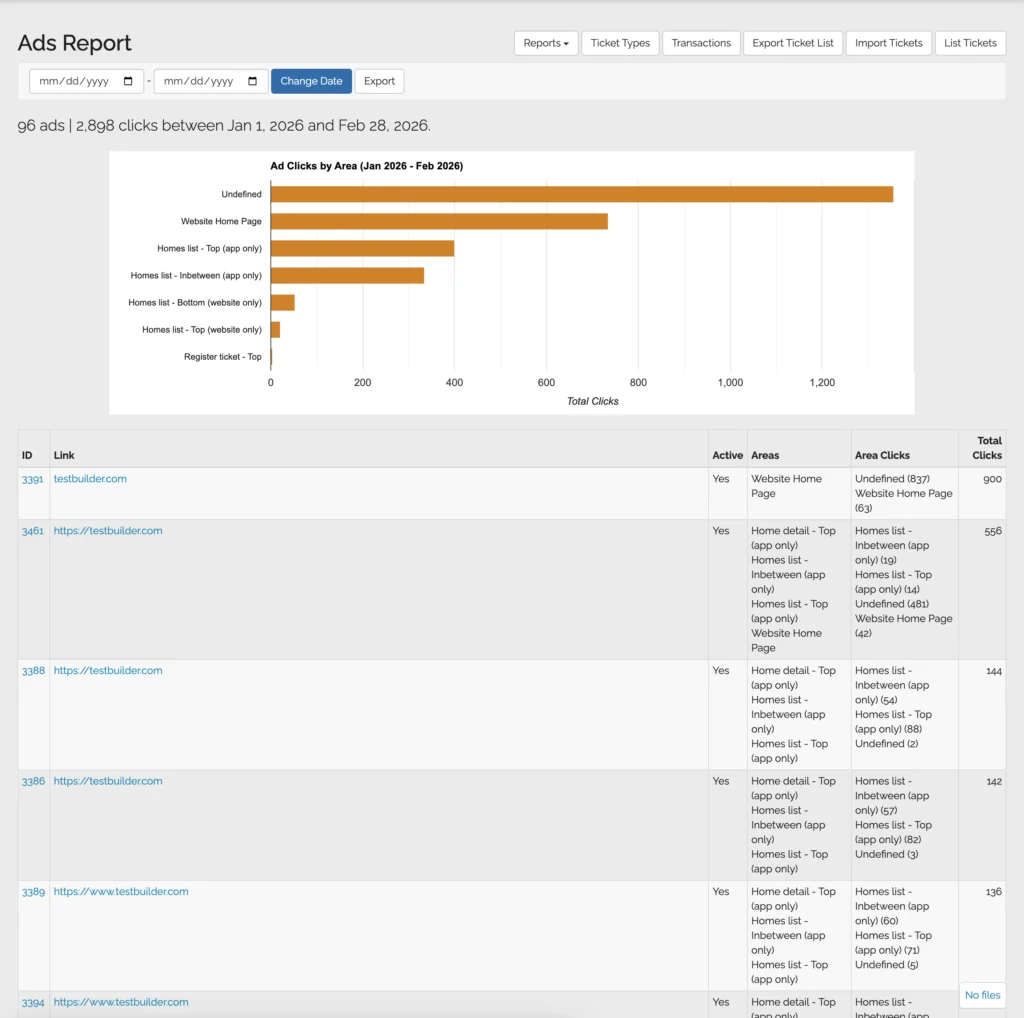
<p>One of the biggest <strong>ParadeSmart updates</strong> is improved reporting. Reports have been updated in the Web Manager, including a <strong>new Ads Report</strong> that makes it easier to understand sponsor ad performance. You can see clicks by placement, view totals, and export a CSV for quick sponsor recaps.</p>
<p><a href="https://docs.google.com/document/d/1kyG5Xjzmx1FaHsECp8sYFQ5whEM-W5IHYke5d8HJY9Y/edit?tab=t.0#bookmark=id.aewc2e6pclgb"><strong>Click Here to Read More About ParadeSmart Reporting</strong></a></p>
<p><img src="/assets/img/blog/paradesmart-updates--update-screenshot-1.webp" alt="ParadeSmart platform update screenshot">
<img src="/assets/img/blog/paradesmart-updates--update-screenshot-3.webp" alt="ParadeSmart platform update screenshot"></p>
<h2 id="updated-advertisement-placements-and-options-web-app" tabindex="-1">UPDATED: Advertisement Placements and Options (Web + App)</h2>
<p>We’ve improved how advertisement placement info shows up in the manager, so it’s easier to confirm where an ad is running. ParadeSmart ads are banner-style images that can be clickable (or not), and can be placed across both your website and mobile app.</p>
<p><img src="/assets/img/blog/paradesmart-updates--set-up-advertisements-web-manager.webp" alt="ParadeSmart Advertising Placements and Options Image"></p>
<p>A few quick basics:</p>
<ul>
<li>Standard banner size: <strong>1200px wide × 200px tall</strong></li>
<li>Use <strong>bigger text and simpler layouts</strong> for app visibility</li>
<li>If you want different designs for website vs app, you can upload an alternate “Intermediate image” for the app</li>
</ul>
<p>And yes, you control your sponsor pricing. ParadeSmart provides the tools, and you keep the sponsorship and ad revenue.</p>
<p><strong>Need more information? <a href="https://docs.google.com/document/d/1kyG5Xjzmx1FaHsECp8sYFQ5whEM-W5IHYke5d8HJY9Y/edit?tab=t.0#bookmark=id.twi95gxt1q6y">Click here to read more about ParadeSmart Advertisment Tools</a>.</strong></p>
<h2 id="new-scannable-dates-on-ticket-types" tabindex="-1">NEW: Scannable Dates on Ticket Types</h2>
<p>You can now set a scan window on a ticket type, so it only scans successfully during the dates you choose. This is perfect for VIP nights, sponsor events, preview parties, or anything with limited access. Ticket sales timing is still separate, so this only controls scanning.</p>
<p><strong>Where to find it:</strong> Tickets → Ticket Types → select a ticket → Scan Start Date / Scan End Date.</p>
<p><img src="/assets/img/blog/paradesmart-updates--update-screenshot-2.webp" alt="ParadeSmart platform update screenshot"></p>
<h2 id="new-builder-ticket-training-materials" tabindex="-1">NEW: Builder Ticket Training Materials</h2>
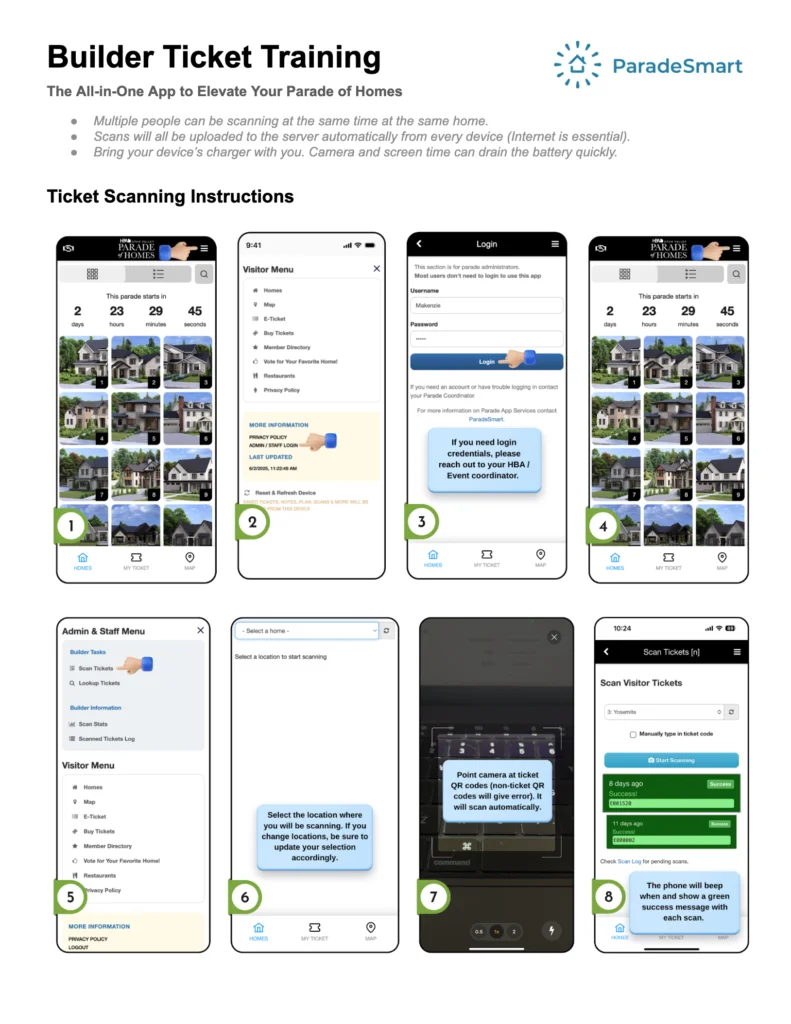
<p>We’ve been expanding our online learning materials to make training easier for your builders and volunteers.</p>
<p><strong>Ticket Training for Builders and Volunteers Video:</strong></p>
<p><a href="https://www.youtube.com/watch?v=2C6SHiIiFsk">https://www.youtube.com/watch?v=2C6SHiIiFsk</a></p>
<p>Feel free to watch and share this with anyone who needs help using ParadeSmart admin tools.</p>
<p>We even have a printout version of this you can utilize in your in-person training sessions, as well as using at each home if anyone needs it.</p>
<p><a href="https://docs.google.com/document/d/1Y-11vMryTkWdvdVa-d3mTSV-kPqr0Ljeh-1gySGANs4/edit?usp=sharing"><strong>Click Here to see the Builder Ticket Training Printout Guide</strong></a></p>
<p><a href="https://docs.google.com/document/d/1Y-11vMryTkWdvdVa-d3mTSV-kPqr0Ljeh-1gySGANs4/edit?usp=sharing"><img src="/assets/img/blog/paradesmart-updates--update-screenshot-4.webp" alt="ParadeSmart platform update screenshot"></a></p>
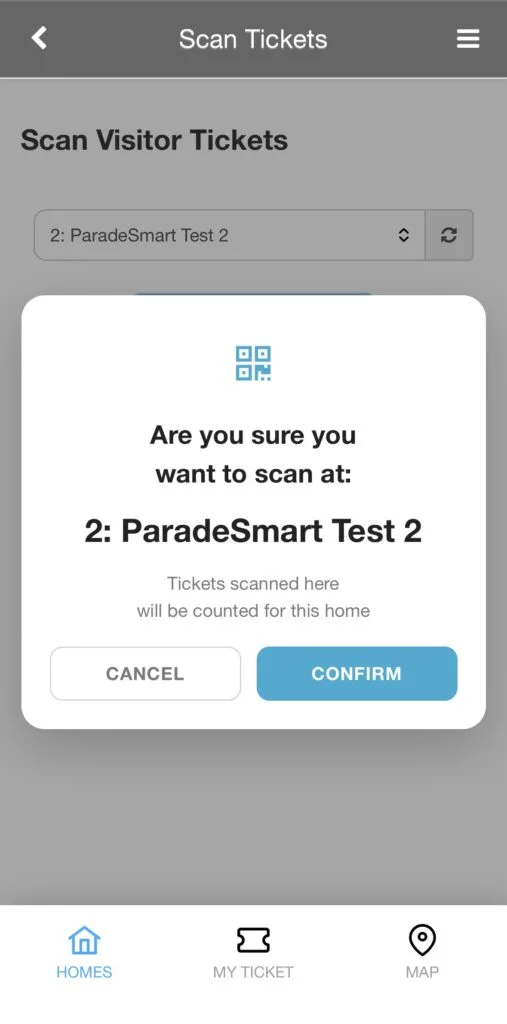
<h2 id="new-builderstaff-multi-home-confirmation-small-change-big-help" tabindex="-1">NEW: Builder/Staff Multi-Home Confirmation (Small Change, Big Help)</h2>
<p>If a builder or staff member is linked to multiple homes, ParadeSmart now helps confirm the correct home connection during scanning and staff workflows. This reduces confusion during busy parade weekends.</p>
<p><img src="/assets/img/blog/paradesmart-updates--builder-confirmation-screen.webp" alt="Builder Confirmation Screen Image"></p>
<p>Builder Scanning Confirmation Popup</p>
<h2 id="update-imports-have-been-updated-faster-bulk-setup" tabindex="-1">UPDATE: Imports Have Been Updated (Faster Bulk Setup)</h2>
<p>We’ve improved and expanded imports across several areas, which means less manual entry and fewer headaches when you’re setting up:</p>
<ul>
<li>Homes import: <a href="https://app.paradesmart.com/manage/parade-homes/import/#/">https://app.paradesmart.com/manage/parade-homes/import/#/</a></li>
<li>Builders import: <a href="https://app.paradesmart.com/manage/builders/import/#/">https://app.paradesmart.com/manage/builders/import/#/</a></li>
<li>Available Jobs import: <a href="https://app.paradesmart.com/manage/available-jobs/import/#/">https://app.paradesmart.com/manage/available-jobs/import/#/</a></li>
<li>Businesses import: <a href="https://app.paradesmart.com/manage/businesses/import/#/">https://app.paradesmart.com/manage/businesses/import/#/</a></li>
<li>Subcontractors import: <a href="https://app.paradesmart.com/manage/subcontractors/import/#/">https://app.paradesmart.com/manage/subcontractors/import/#/</a></li>
</ul>
<p><strong>Note:</strong> If you leave fields blank, the information will not delete or override existing information. If you need to delete data, you can enter a replacement value such as “N/A,” or manually remove it in the Manager.</p>
<h2 id="new-kiosk-option-with-barcode-scanner" tabindex="-1">NEW: Kiosk Option (With Barcode Scanner)</h2>
<p>We’ve added a kiosk option for scanning workflows, including support for a barcode scanner setup. This is a great fit for high-traffic entrances or events that want a simple walk-up scanning experience.</p>
<p><img src="/assets/img/blog/paradesmart-updates--kiosk-scanner-setup-paradesmart.webp" alt="kiosk scanner setup ParadeSmart"></p>
<h2 id="coming-soon-ticket-packs-bulk-sending" tabindex="-1">COMING SOON: Ticket Packs Bulk Sending</h2>
<p>This one is still in the works, but it’s exciting. Ticket packs are designed for bulk and group buying.</p>
<p>Think realtor groups, sponsors, teams, or companies buying tickets for clients and employees. The goal is to make it easy to purchase in bulk and distribute tickets to multiple recipients without manual back-and-forth.</p>
<p>This will also be a big improvement if you regularly handle bulk complimentary tickets.</p>
<hr>
<p>These ParadeSmart updates are just the start. We’re continuing to improve ParadeSmart based on feedback from HBAs, builders, and attendees. If you have questions, or if there’s something you’d love to see next, email <a href="mailto:support@paradesmart.com">support@paradesmart.com</a>. We’d love to hear from you!</p>
<p><img src="/assets/img/blog/sister-parade-of-homes--paradesmart-logo-horizontal-blue-soft.webp" alt="ParadeSmart Blue Logo"></p>
]]></content>
    <category term="Inside the ParadeSmart App"/>
  </entry>
  
  <entry>
    <title>Stronger Together: How Sister Parades Can Expand Your Audience and Boost Engagement</title>
    <link href="https://paradesmart.com/blog/sister-parade-of-homes/"/>
    <updated>2025-11-14T00:00:00Z</updated>
    <id>https://paradesmart.com/blog/sister-parade-of-homes/</id>
    <summary>Discover how a Sister Parade of Homes setup helps HBAs grow their audience, share tickets, and connect with other regions using ParadeSmart.</summary>
    <content type="html"><![CDATA[<h3 id="share-visitors-amplify-exposure-and-strengthen-regional-collaboration" tabindex="-1">Share Visitors, Amplify Exposure, and Strengthen Regional Collaboration</h3>
<p>Try one of ParadeSmart’s newest features: the Sister Parade of Homes setup. It’s a great way for nearby HBAs to collaborate while still running separate events. Each parade keeps its own identity, branding, and app, but shares one key feature: a ticket that allows attendees to visit more than one parade.</p>
<p>Whether you are coordinating with one other HBA or partnering with multiple regions, this setup helps everyone involved. Attendees get more value from their ticket. Builders gain exposure to a wider audience. HBAs benefit from combined marketing efforts and stronger turnout.</p>
<p><img src="/assets/img/blog/sister-parade-of-homes--better-together.webp" alt="Sister Parade of Homes with Parade Smart - One ticket, entry to two or more events"></p>
<h2 id="what-is-a-sister-parade-of-homes" tabindex="-1">What Is a Sister Parade of Homes?</h2>
<p>A sister parade setup allows two parades in nearby areas to offer a shared ticket option. Each parade still runs independently and manages its own content, but participants who purchase a combo ticket gain access to all participating events.</p>
<h3 id="how-it-works" tabindex="-1">How It Works:</h3>
<ul>
<li><strong>Each parade uses its own app and dashboard.</strong> You keep full control over your homes, content, and ticket types.</li>
<li><strong>A shared ticket type is created.</strong> This special ticket gives access to both participating parades. Incentivize visitors with a discount!</li>
<li>Visitors can register the combined ticket in each parade’s app and use it for entry at both events.</li>
<li>Each parade will receive analytics and reports from the shared tickets.</li>
<li><strong>Marketing can be combined.</strong> Parades can promote each other, run cross-region campaigns, and highlight the joint ticket on their websites or print materials.</li>
</ul>
<p><img src="/assets/img/blog/sister-parade-of-homes--sister-parade-tickets.webp" alt="Phone screens showing two parades that use the sister ticketing"></p>
<h2 id="why-sister-parades-make-sense" tabindex="-1">Why Sister Parades Make Sense</h2>
<ul>
<li><strong>Attract more out-of-town visitors.</strong> Many attendees are willing to travel for multiple events when the timeline is right.</li>
<li><strong>Grow your reach without extra work.</strong> Builders and sponsors get more visibility by participating in events across multiple markets.</li>
<li><strong>Build community between HBAs.</strong> Rather than competing, sister parades support one another and grow their collective impact.</li>
<li><strong>Offer better value for attendees.</strong> A combo ticket encourages buyers to visit more homes and spend more time engaging with the parade experience.</li>
</ul>
<p><img src="/assets/img/blog/sister-parade-of-homes--visitors-walking.webp" alt="A couple walking in front of a home event"></p>
<h2 id="interested-in-setting-up-sister-parade-events" tabindex="-1">Interested in Setting Up Sister Parade Events?</h2>
<p>If you are planning a parade and know of other HBAs in your region with similar dates, this is a great opportunity to collaborate. Our team can help you create a shared ticket type, and set up the connection between apps.</p>
<p>Even better, invite an event that hasn’t used ParadeSmart before using our <a href="https://39821155.hs-sites.com/referral-program">referral program</a> and <strong>you get 5 free homes</strong>, and <strong>they get 10% off EVERYTHING for their first event</strong>! It’s a win-win for everyone!</p>
<p>Email <a href="mailto:support@paradesmart.co">support@paradesmart.co</a>m and we’ll help you get started.</p>
<p><img src="/assets/img/blog/sister-parade-of-homes--paradesmart-logo-horizontal-blue-soft.webp" alt="ParadeSmart Blue Logo"></p>
]]></content>
    <category term="Future of Home Parades &amp; Tech"/>
  </entry>
  
  <entry>
    <title>Parade of Homes Planning Checklist: 7 Off-Season Tasks to Set You Up for Success</title>
    <link href="https://paradesmart.com/blog/parade-of-homes-planning-checklist/"/>
    <updated>2025-11-11T00:00:00Z</updated>
    <id>https://paradesmart.com/blog/parade-of-homes-planning-checklist/</id>
    <summary>Get ahead of next year with this Parade of Homes planning checklist featuring 7 off-season tasks for builders, sponsors, and HBAs.</summary>
    <content type="html"><![CDATA[<h3 id="light-planning-today-saves-a-lot-of-time-later" tabindex="-1">Light planning today saves a lot of time later</h3>
<p>Creating a Parade of Homes planning checklist during the off-season can make next year’s event smoother, less stressful, and more successful. Once it’s wrapped, it can be tempting to close the laptop and not think about it again until a the month before your big event. But the off-season is actually the perfect time to knock out a few easy planning tasks so you’re not starting from scratch later.</p>
<p>Here are a few smart things you can do now to make next year’s parade smoother, less stressful, and even more successful.</p>
<p><img src="/assets/img/blog/parade-of-homes-planning-checklist--new-year.webp" alt="7 things hbas can do now to prep for next year parade of homes event"></p>
<h2 id="1-review-your-builder-list-outside-the-dashboard" tabindex="-1">1. Review Your Builder List (Outside the Dashboard)</h2>
<p>Now is a good time to start organizing builder info for next year’s outreach.</p>
<ul>
<li>Make a separate list of builders who participated this year</li>
<li>Note which builders you’d like to invite back</li>
<li>Track new builder leads or companies that expressed interest</li>
</ul>
<p>This list can be used for early marketing, packet planning, and sponsorship opportunities.</p>
<p>NOTE: Just be sure not to delete any builder records from your ParadeSmart dashboard, since that would also remove all of their homes and data.</p>
<h2 id="2-look-at-ticket-types-and-sales-patterns" tabindex="-1">2. Look at Ticket Types and Sales Patterns</h2>
<p>Take a few minutes to review your ticketing setup.</p>
<ul>
<li>Which ticket types sold best?</li>
<li>Were there too many options or not enough?</li>
<li>Did digital or printed tickets get used more often?</li>
<li>Would you like to go fully digital?</li>
</ul>
<p>Your ParadeSmart reports can help you spot trends and simplify or expand offerings next time.</p>
<p><img src="/assets/img/blog/parade-of-homes-planning-checklist--prepare-for-2026.webp" alt="computer screen of the paradesmart dashboard with analytics"></p>
<h2 id="3-start-drafting-next-years-builder-packet" tabindex="-1">3. Start Drafting Next Year’s Builder Packet</h2>
<p>If you already have a general sense of dates and pricing, now’s a great time to sketch out your 2026 builder packet.</p>
<ul>
<li>Outline pricing tiers</li>
<li>Define your due dates for builders to participate</li>
<li>Consider offering extra marketing exposure in the app or on the website</li>
</ul>
<p> Even a rough draft now will save hours when it’s time to launch registration.</p>
<h2 id="4-rework-your-sponsorship-tiers" tabindex="-1">4. Rework Your Sponsorship Tiers</h2>
<p>Use this quiet season to revisit your sponsor structure.</p>
<ul>
<li>Are you offering clear visibility at different budget levels?</li>
<li>Do your top-tier sponsors get exposure in the app, on the website, and in printed materials?</li>
<li>Can you offer ad placement, featured listings, or tiered options?</li>
</ul>
<p>You don’t have to finalize anything yet. Just jot down ideas while this year is fresh in your mind.</p>
<p><img src="/assets/img/blog/parade-of-homes-planning-checklist--sponsors.webp" alt="phone screen showing sponsors for a parade of homes event"></p>
<h2 id="5-refresh-your-website" tabindex="-1">5. Refresh Your Website</h2>
<p>Even a quick clean-up makes a difference.</p>
<ul>
<li>Remove outdated dates, images, or messages</li>
<li>Add a placeholder for your next parade, even if you don’t have details yet</li>
<li>Review any builder, sponsor, or restaurant pages and mark what needs updating next year</li>
</ul>
<p>This helps you keep momentum even between events.</p>
<h2 id="6-export-and-archive-key-reports" tabindex="-1">6. Export and Archive Key Reports</h2>
<p>Now is the time to download and store reports while everything is fresh. Save these reports to support your Parade of Homes planning checklist:</p>
<ul>
<li>Ticket sales and scan reports</li>
<li>Responses to demographic questions</li>
<li>Lists of scanned builders and visitors (if opted in)</li>
</ul>
<p> Backing these up now makes comparisons easier next year and gives you a head start on planning.</p>
<p><img src="/assets/img/blog/how-technology-is-transforming-parade-of-homes--home-visits-report-scaled.webp" alt="computer screen showing the reporting done by paradesmart for tickets scanned at a parade of homes event"></p>
<h2 id="7-lock-in-2026-and-save-10" tabindex="-1">7. Lock in 2026 and Save 10%</h2>
<p>If you already know you’ll be using ParadeSmart for your 2026 event, we’d love to get you on the calendar.<br>
<strong>Commit before December 31, 2025 and put down your 50% deposit to receive 10% off next year’s total.</strong></p>
<p>Just reach out to <a href="mailto:support@paradesmart.com">support@paradesmart.com</a> and we’ll get your event reserved.</p>
<p>This Parade of Homes planning checklist gives your team a head start before the rush begins.</p>
<p><img src="/assets/img/blog/parade-of-homes-planning-checklist--parade-referral.webp" alt="parade referral"></p>
]]></content>
    <category term="Event Management Insights"/>
  </entry>
  
  <entry>
    <title>How Builders Can Maximize Exposure with Your Parade of Homes App</title>
    <link href="https://paradesmart.com/blog/builder-exposure-parade-app/"/>
    <updated>2025-07-01T00:00:00Z</updated>
    <id>https://paradesmart.com/blog/builder-exposure-parade-app/</id>
    <summary>Help builders get more exposure with the ParadeSmart app by adding profiles, photos, and lead tools.</summary>
    <content type="html"><![CDATA[<h3 id="your-parade-app-isnt-just-for-attendees-its-a-powerful-tool-for-builders-too" tabindex="-1">Your parade app isn’t just for attendees. It’s a powerful tool for builders too.</h3>
<p>Participating in a Parade of Homes is a major investment of time and effort for builders. From staging and signage to staff and marketing, a lot goes into showing off your work. That’s why we designed the <strong>ParadeSmart app</strong> to support builders at every step. It is built to enhance your presence, not just deliver a great visitor experience.</p>
<p>Here are the key ways you can use the app to increase your exposure, connect with visitors, and turn tour traffic into long-term leads.</p>
<h2 id="showcase-your-brand-inside-the-app" tabindex="-1">Showcase Your Brand Inside the App</h2>
<p>Each builder has a profile that appears to every app user. This is your space to:</p>
<ul>
<li>Add your logo and contact information</li>
<li>Share a short bio or introduction</li>
<li>Link to your website and social media pages</li>
<li>Display the homes you are featured in</li>
</ul>
<p>Think of it as a digital business card that lives in the app for the entire event.</p>
<p><img src="/assets/img/blog/how-technology-is-transforming-parade-of-homes--builder-information.webp" alt="builder information"></p>
<h2 id="upload-photos-details-and-video-tours-of-your-homes" tabindex="-1">Upload Photos, Details, and Video Tours of Your Homes</h2>
<p>Make the most of your listing by adding:</p>
<ul>
<li>A photo gallery for each home</li>
<li>Specs like square footage, price, and key features</li>
<li>Optional video or virtual tours if your parade includes them</li>
</ul>
<p>This gives attendees a reason to return to your listing even after they have left the home.</p>
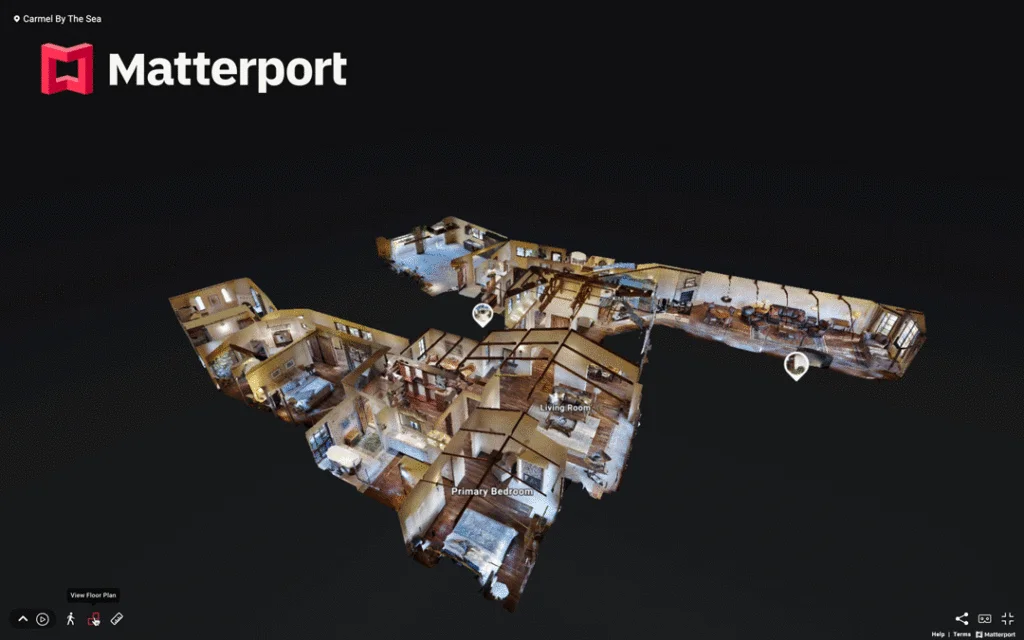
<p><img src="/assets/img/blog/how-to-utilize-virtual-tours-within-paradesmart--matterport-view.webp" alt="matterport view"></p>
<h2 id="collect-leads-through-ticket-scanning" tabindex="-1">Collect Leads Through Ticket Scanning</h2>
<p>Each time a ticket is scanned at your home, you gain access to that visitor’s data if they opt in. Inside the ParadeSmart backend, you can view:</p>
<ul>
<li>Names and emails</li>
<li>Daily visitor counts</li>
<li>A list of scanned entries for follow-up</li>
</ul>
<p>This gives you real contacts instead of just foot traffic.</p>
<h2 id="use-the-app-to-scan-tickets" tabindex="-1">Use the App to Scan Tickets</h2>
<p>Builders who assist with ticketing can:</p>
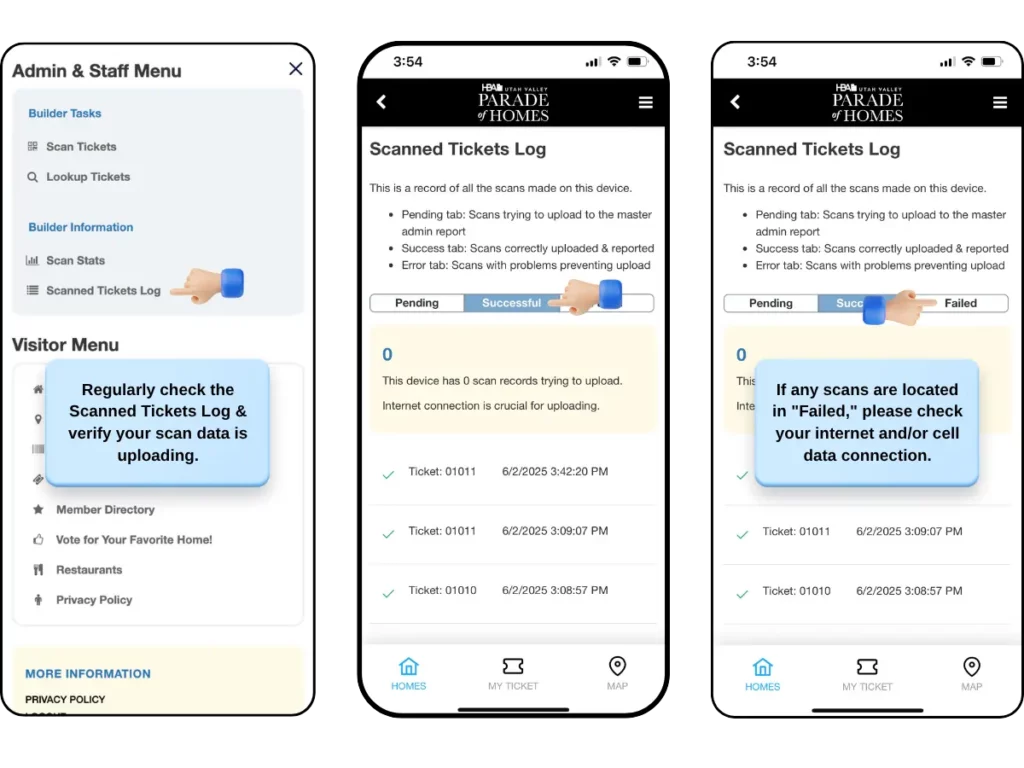
<ul>
<li>Use their phones to scan visitor tickets</li>
<li>Sell digital or printed tickets directly in the app if the HBA allows</li>
<li>Access a scan log that shows ticket entries by day</li>
</ul>
<p>These tools help builders support the event while staying organized and efficient.</p>
<p><img src="/assets/img/blog/builder-exposure-parade-app--scan-ticket.webp" alt="scan ticket"></p>
<h2 id="access-admin-tools-and-reports" tabindex="-1">Access Admin Tools and Reports</h2>
<p>Builder logins provide access to additional tools through the app’s menu. With these features, you can:</p>
<ul>
<li>View scan activity</li>
<li>Track ticket scan status such as pending, successful, or error</li>
<li>Look up ticket information for verification</li>
</ul>
<p>This makes it easier to stay informed during the parade without needing printed records.</p>
<p><img src="/assets/img/blog/top-5-common-traits-of-high-performing-parade-of-homes-events--parade-visitor-analytics-scaled.webp" alt="parade visitor analytics"></p>
<h2 id="bonus-tip" tabindex="-1">Bonus Tip:</h2>
<p>To make a strong impression on attendees:</p>
<ul>
<li>Upload a high-quality logo and image</li>
<li>Ensure contact details and website links are up-to-date</li>
<li>Write clear and engaging descriptions for your homes</li>
</ul>
<p>Many attendees return to the app after the event to look up homes they liked. Keeping your profile fresh helps you stand out.</p>
]]></content>
    <category term="Event Management Insights"/>
  </entry>
  
  <entry>
    <title>What Should You Ask On Your Ticketing Form? Demographic Insights That Matter</title>
    <link href="https://paradesmart.com/blog/parade-ticketing-demographics/"/>
    <updated>2025-06-24T00:00:00Z</updated>
    <id>https://paradesmart.com/blog/parade-ticketing-demographics/</id>
    <summary>Use your Parade of Homes ticketing form to gather insights for marketing, sponsors, and builder leads.</summary>
    <content type="html"><![CDATA[<h2 id="suggestions-based-on-past-events-and-trends-to-help-you-collect-meaningful-data" tabindex="-1">Suggestions based on past events and trends to help you collect meaningful data</h2>
<p>When someone buys a ticket to your Parade of Homes event, it’s a perfect opportunity to learn more about your audience. Asking the right questions on your ticketing form can give you valuable insights—not only for marketing but also for builder engagement, sponsorship reporting, and planning future events.</p>
<p>Here’s how to make the most of the ticket purchase moment, along with smart question options to include on your form.</p>
<hr>
<p><img src="/assets/img/blog/parade-ticketing-demographics--buying-tickets.webp" alt="buying tickets"></p>
<h2 id="why-demographics-matter" tabindex="-1">Why Demographics Matter</h2>
<p>Every year, ParadeSmart clients collect thousands of ticket purchases through their event apps and websites. When clients choose to add demographic questions at checkout, they gain access to helpful data like:</p>
<ul>
<li>Where attendees are coming from</li>
<li>Whether they’re serious homebuyers or just browsing</li>
<li>What marketing channels are working</li>
<li>Which visitors are open to follow-up contact</li>
</ul>
<p>This data helps HBAs make better decisions, supports sponsor reports, and provides valuable lead data to builders.</p>
<h2 id="tips-for-choosing-the-right-questions" tabindex="-1">Tips for Choosing the Right Questions</h2>
<ul>
<li><strong>Keep it short.</strong> Try to stick to 3 to 5 quick questions. You’ll get more answers if it doesn’t feel like a survey.</li>
<li><strong>Make most questions optional.</strong> If a buyer feels like they can’t answer a required question, you may lose a sale.</li>
<li><strong>Think about your goals.</strong> Are you collecting leads? Planning future parades? Reporting to sponsors?</li>
</ul>
<p><img src="/assets/img/blog/digital-ticketing-for-parade-of-homes--demographic-questions.webp" alt="demographic questions"></p>
<h2 id="popular-ticketing-questions-to-consider" tabindex="-1">Popular Ticketing Questions to Consider</h2>
<p>Here are some of the most common and useful fields offered for ParadeSmart events:</p>
<h4 id="zip-code" tabindex="-1">ZIP Code</h4>
<p>Helps you track how far visitors are traveling. Useful for regional marketing and sponsor reach.</p>
<h4 id="are-you-planning-to-build-or-buy-a-home-in-the-next-year" tabindex="-1">Are you planning to build or buy a home in the next year?</h4>
<p>This identifies serious buyers and can be shared with builders as leads.</p>
<h4 id="are-you-interested-in-being-contacted-by-a-builder-or-vendor-from-this-event" tabindex="-1">Are you interested in being contacted by a builder or vendor from this event?</h4>
<p>Great for lead generation. Use clear language and be sure your privacy policy is linked.</p>
<h4 id="would-you-like-to-receive-updates-or-newsletters-about-future-events" tabindex="-1">Would you like to receive updates or newsletters about future events?</h4>
<p>This helps grow your email list for future parade marketing.</p>
<h4 id="what-best-describes-you" tabindex="-1">What best describes you?</h4>
<p>Examples:</p>
<ul>
<li>Homeowner looking to build soon</li>
<li>Interior design enthusiast</li>
<li>Industry professional</li>
<li>Just browsing</li>
</ul>
<p>This question helps you understand your audience breakdown for future planning.</p>
<hr>
<p><img src="/assets/img/blog/parade-ticketing-demographics--home-buyer-visitors.webp" alt="home buyer visitors"></p>
<p><strong>Want help updating your ticketing form before your next event?</strong><br>
We can add, adjust, or remove demographic questions for you. Just send your request to <a href="mailto:support@paradesmart.com">support@paradesmart.com</a>.</p>
]]></content>
    <category term="Event Management Insights"/>
  </entry>
  
  <entry>
    <title>A Fresh Look: The ParadeSmart App is Getting an Upgrade</title>
    <link href="https://paradesmart.com/blog/paradesmart-app-new-upgrade/"/>
    <updated>2025-06-17T00:00:00Z</updated>
    <id>https://paradesmart.com/blog/paradesmart-app-new-upgrade/</id>
    <summary>See what&#39;s new in the ParadeSmart app update, including improved navigation, scan tracking, and tools for builders and attendees.</summary>
    <content type="html"><![CDATA[<p>Better navigation, clearer scanning logs, and a smoother experience for everyone</p>
<p>We’re excited to announce a fresh new user interface (UI) rolling out to all ParadeSmart event apps. These updates are designed with both <strong>visitors and builder/admin users in mind</strong>, improving clarity, accessibility, and overall ease of use.</p>
<p>Whether you’re scanning tickets or browsing homes, these changes aim to make the ParadeSmart app feel more intuitive and polished.</p>
<p><img src="/assets/img/blog/paradesmart-app-new-upgrade--new-look.webp" alt="new look"></p>
<h2 id="whats-already-starting-to-roll-out" tabindex="-1">What’s Already Starting to Roll Out</h2>
<p><img src="/assets/img/blog/paradesmart-app-new-upgrade--scanned-ticket-log.webp" alt="scanned ticket log"></p>
<h3 id="ticket-scanning-status-page" tabindex="-1">Ticket Scanning Status Page</h3>
<p>Admin and staff users can now view a detailed status of every scan made on a device:</p>
<ul>
<li><strong>Pending</strong>: Scans waiting to upload</li>
<li><strong>Success</strong>: Confirmed and submitted scans</li>
<li><strong>Error</strong>: Scans that encountered a problem</li>
</ul>
<p>Each scan includes a timestamp and tracking information, helping admins better monitor activity and address any issues that arise.</p>
<p><img src="/assets/img/blog/paradesmart-app-new-upgrade--new-menus-copy.webp" alt="new menus copy"></p>
<h3 id="more-intuitive-bottom-navigation-menu-access" tabindex="-1">More Intuitive Bottom Navigation &amp; Menu Access</h3>
<p>The bottom navigation bar has been redesigned for simplicity. It gives visitors fast access to:</p>
<ul>
<li>Home listings</li>
<li>Their digital ticket or tickets</li>
<li>The event map</li>
</ul>
<p>The hamburger menu has also been restructured:</p>
<ul>
<li>Attendees without logins can now use this menu to explore features like sponsors, restaurants, digital magazines, and more</li>
<li>Builders and staff with logins will see additional options like the admin menu, ticket tools, and scan logs, all organized in one place</li>
</ul>
<h2 id="coming-soon" tabindex="-1">Coming Soon</h2>
<p><img src="/assets/img/blog/paradesmart-app-new-upgrade--updated-designs.webp" alt="updated designs"></p>
<h3 id="updated-ticket-purchase-flow" tabindex="-1">Updated Ticket Purchase Flow</h3>
<p>We’re updating the design of the ticket buying experience with simplified screens, better visual hierarchy, and a more intuitive flow for adding and managing tickets.</p>
<h3 id="revamped-digital-maps" tabindex="-1">Revamped Digital Maps</h3>
<p>Upcoming updates to the map interface will help guests better understand where homes are located, with easier access to navigation tools and clearer labeling.</p>
<h3 id="new-home-filters-for-easier-browsing" tabindex="-1">New Home Filters for Easier Browsing</h3>
<p>We’re adding <strong>home filters</strong> to help visitors sort listings by location, builder, or other categories. This makes it easier for attendees to find the homes they want to visit most—especially in larger parades with dozens of entries.</p>
<p>This update will be a welcome improvement over the current long scroll list, helping guests plan their route more efficiently.</p>
<p><img src="/assets/img/blog/paradesmart-app-new-upgrade--happy-visitor.webp" alt="happy visitor"></p>
<h2 id="why-this-matters-for-hbas-builders" tabindex="-1">Why This Matters for HBAs &amp; Builders</h2>
<ul>
<li>Improves the usability of ticket tools and admin functions</li>
<li>Makes app navigation more intuitive for both staff and attendees</li>
<li>Clarifies ticket scan reporting and troubleshooting</li>
<li>Prepares your app to support additional features and future updates</li>
</ul>
<p>**These updates are being rolled out gradually to all apps.**If you’d like a preview or want help exploring what the new interface looks like for your event, email <a href="mailto:support@paradesmart.com">support@paradesmart.com</a> and we’ll walk you through it.</p>
]]></content>
    <category term="Inside the ParadeSmart App"/>
  </entry>
  
  <entry>
    <title>From Paper to Pixel: Why Digital Tickets Improve Your Event</title>
    <link href="https://paradesmart.com/blog/digital-ticketing-for-parade-of-homes/"/>
    <updated>2025-06-14T00:00:00Z</updated>
    <id>https://paradesmart.com/blog/digital-ticketing-for-parade-of-homes/</id>
    <summary>Learn how digital ticketing for Parade of Homes events simplifies entry, cuts costs, and helps you understand your audience better.</summary>
    <content type="html"><![CDATA[<p>Ticketing is often the first touchpoint visitors have with your Parade of Homes. Whether you use digital or paper, or a mix of both, it’s important to make the experience as smooth and welcoming as possible.</p>
<p>While paper tickets continue to work well for many events, digital tickets offer added convenience and flexibility for both organizers and attendees. They reduce logistical steps, lower costs, and provide helpful analytics that paper can’t match. Many events choose to offer both formats so visitors can pick what works best for them.</p>
<p>Here are several reasons why digital ticketing is becoming a popular option for many parades.</p>
<p><img src="/assets/img/blog/digital-ticketing-for-parade-of-homes--bought-a-ticket.webp" alt="bought a ticket"></p>
<h2 id="instant-delivery-means-happy-visitors" tabindex="-1">Instant Delivery Means Happy Visitors</h2>
<p>Digital tickets are sent immediately to each visitor’s email after purchase. The email includes a PDF attachment for every ticket bought, making them easy to access and share. There’s no waiting, no driving to a pickup location, and no risk of losing a physical copy. Visitors can also view their ticket directly inside your branded app at any time. It’s quick, convenient, and eliminates last-minute stress.</p>
<p>And it gets even better! If a visitor purchases their ticket in your app, that ticket is automatically saved to their phone. No more pulling up emails or typing in access codes. With that one easy step they’re ready to visit homes, view virtual tours and vote!</p>
<p><img src="/assets/img/blog/digital-ticketing-for-parade-of-homes--demographic-questions.webp" alt="demographic questions"></p>
<h2 id="capture-valuable-demographic-information" tabindex="-1">Capture Valuable Demographic Information</h2>
<p>When attendees purchase digital tickets, you can ask custom questions during checkout, such as ZIP code, housing plans, or whether they want to join your newsletter. This data helps builders and associations better understand their audience and follow up more effectively after the event.</p>
<p><img src="/assets/img/blog/digital-ticketing-for-parade-of-homes--ticket-types.webp" alt="ticket types"></p>
<h2 id="easier-management-of-promotions-and-free-tickets" tabindex="-1">Easier Management of Promotions and Free Tickets</h2>
<p>Need to offer a sponsor, builder, or local partner a set of free or discounted tickets? Digital ticketing makes this simple. You can generate promo codes or create special ticket types in just a few clicks. There is no physical handling or printing required. If you need help with setting this up within your ParadeSmart Dashboard, reach out to our team for assistance!</p>
<p><img src="/assets/img/blog/digital-ticketing-for-parade-of-homes--my-ticket-page-scaled.webp" alt="my ticket page"></p>
<h2 id="reduce-costs-and-logistical-headaches" tabindex="-1">Reduce Costs and Logistical Headaches</h2>
<p>With paper tickets, you need to send a list of hash codes to a printer, wait for them to convert the codes into QR tickets, and then pay to have them printed. Distribution also requires staff or volunteers to sell tickets in person at one or more locations. Digital ticketing removes most of these steps, saving time and resources while still offering a great guest experience.</p>
<p><img src="/assets/img/blog/digital-ticketing-for-parade-of-homes--ticket-information-parade-of-homes.webp" alt="ticket information parade of homes"></p>
<h2 id="bonus-use-both-systems-together" tabindex="-1">BONUS: Use Both Systems Together</h2>
<p>Many ParadeSmart clients use both digital and paper tickets to meet the needs of their audience. You can easily support digital ticketing through your app while still offering printed tickets at select outlets. The backend system tracks and scans both types, so you’re covered no matter which path guests take.</p>
<p><img src="/assets/img/blog/digital-ticketing-for-parade-of-homes--easier-tickets.webp" alt="easier tickets"></p>
<hr>
<h3 id="want-to-explore-digital-ticketing-options-for-your-next-event" tabindex="-1">Want to explore digital ticketing options for your next event?</h3>
<p>If you’re an existing ParadeSmart client with ticketing, we’re happy to help you set it up, answer questions, or walk you through a hybrid approach. Just reach out to our support team at <a href="mailto:support@paradesmart.com">support@paradesmart.com</a>.</p>
<p>If you’re interested in learning more about our services, fill out our form below to get in touch with our team!</p>
]]></content>
    <category term="Future of Home Parades &amp; Tech"/>
  </entry>
  
  <entry>
    <title>Essential Website Content for a Successful Parade of Homes</title>
    <link href="https://paradesmart.com/blog/essential-website-content-for-a-successful-parade-of-homes/"/>
    <updated>2025-06-04T00:00:00Z</updated>
    <id>https://paradesmart.com/blog/essential-website-content-for-a-successful-parade-of-homes/</id>
    <summary>A well-organized, informative website sets the tone for your entire Parade of Homes event. It answers common questions, showcases the homes, and helps attend...</summary>
    <content type="html"><![CDATA[<h3 id="what-every-parade-website-should-include-to-inform-inspire-and-engage-visitors" tabindex="-1">What every parade website should include to inform, inspire, and engage visitors</h3>
<p>A well-organized, informative website sets the tone for your entire Parade of Homes event. It answers common questions, showcases the homes, and helps attendees plan their visit with confidence. Whether you’re building a new site or updating an existing one, here are the key pages and features every successful parade website should include.</p>
<h2 id="homepage-your-first-impression" tabindex="-1">Homepage: Your First Impression</h2>
<p>Your homepage is the hub for quick info and event promotion. Make it visually appealing and include:</p>
<ul>
<li><strong>Event dates and hours</strong></li>
<li>A <strong>link to buy tickets</strong></li>
<li><strong>Photos of featured homes</strong></li>
<li>A <strong>short summary</strong> of what to expect, such as in-person tours, virtual tours, or awards</li>
</ul>
<p><strong>Tip:</strong> Add a call-to-action at the top for tickets or virtual access to immediately grab visitor attention.</p>
<p><img src="/assets/img/blog/essential-website-content-for-a-successful-parade-of-homes--paradeofhomes-homepage-examples2.webp" alt="Homepage Hero Examples of Parade of Homes websites"></p>
<h2 id="homes-page-showcase-every-home" tabindex="-1">Homes Page: Showcase Every Home</h2>
<p>The homes page should at the very least list all participating homes with photos, builder name, and home number/name. When using ParadeSmart, these pages are generated automatically based on what’s entered into your manager.</p>
<p>Visitors expect:</p>
<ul>
<li>High-quality photos</li>
<li>Builder names and bios</li>
<li>Home features or highlights</li>
<li>Location details</li>
</ul>
<p>Make sure each home can be clicked into for a full detail page.</p>
<p><img src="/assets/img/blog/essential-website-content-for-a-successful-parade-of-homes--homes-listings.webp" alt="Home Listings at ParadeSmart- essential website content for a successful parade of homes"></p>
<h2 id="maps-make-navigation-easy" tabindex="-1">Maps: Make Navigation Easy</h2>
<p>An easy-to-use map helps visitors plan their route and avoid confusion. ParadeSmart provides interactive digital maps based on GPS coordinates entered in the home setup.</p>
<p>You can also offer:</p>
<ul>
<li>A downloadable PDF map for those who want to print or save it</li>
<li>Notes about neighborhoods that may not appear accurately in digital maps</li>
<li>Tips for locating homes in new developments</li>
</ul>
<p><img src="/assets/img/blog/essential-website-content-for-a-successful-parade-of-homes--paradeofhomes-map.webp" alt="Map for Parade of Homes event"></p>
<h2 id="ticket-information-make-it-clear" tabindex="-1">Ticket Information: Make It Clear</h2>
<p>If your event includes tickets, provide a full page with:</p>
<ul>
<li>Ticket types and pricing
<ul>
<li>Let your attendees know if you’re selling physical tickets or e-tickets</li>
<li>If you’re selling physical tickets, where will they go to buy them?</li>
</ul>
</li>
<li>Sales dates and deadlines</li>
<li>Purchase links</li>
<li>Information on how guests will receive their tickets</li>
<li>What to do if someone needs help with their order</li>
</ul>
<p>Keeping this information front and center prevents confusion and reduces support requests.</p>
<p><img src="/assets/img/blog/digital-ticketing-for-parade-of-homes--ticket-information-parade-of-homes.webp" alt="Essential Website Content for a Successful Parade of Homes is to have ticket information"></p>
<h2 id="general-info-rules-set-expectations-early" tabindex="-1">General Info &amp; Rules: Set Expectations Early</h2>
<p>Every parade has different expectations. Use this section to spell out what visitors need to know. For example:</p>
<ul>
<li>Are shoes or socks required inside homes?</li>
<li>Is the event stroller-friendly?</li>
<li>Are pets allowed? What about service animals?</li>
<li>What are the hours and parking options?</li>
<li>Include answers to frequently asked questions</li>
</ul>
<p>When expectations are clear, it’s easier for volunteers and builders to kindly enforce them.</p>
<p><img src="/assets/img/blog/essential-website-content-for-a-successful-parade-of-homes--website-faqs.webp" alt="FAQ page or general information page is helpful for your parade of homes event"></p>
<h2 id="contact-information-offer-easy-support" tabindex="-1">Contact Information: Offer Easy Support</h2>
<p>A contact page ensures visitors know where to go if they need help. Include:</p>
<ul>
<li>A support email link</li>
<li>A phone number if you offer day-of assistance</li>
<li>Social media links for real-time updates</li>
</ul>
<h2 id="optional-extras-that-add-big-value" tabindex="-1">Optional Extras That Add Big Value</h2>
<p>Depending on your event, these pages can help boost engagement and support local partners:</p>
<ul>
<li>A restaurant page with food options or discounts</li>
<li>An awards or voting page showing categories and winners</li>
<li>A sponsor page with clickable logos or descriptions</li>
</ul>
<p>These additions turn your website into a helpful, all-in-one guide for attendees.</p>
<p><img src="/assets/img/blog/essential-website-content-for-a-successful-parade-of-homes--bestofparade-awards.webp" alt="Parade of Homes winners"></p>
<hr>
<p><strong>Need help organizing your content or building your parade website?</strong></p>
<p>Our team at ParadeSmart is here to help with quick turnaround and support. Email <a href="mailto:support@paradesmart.com">support@paradesmart.com</a> to get started.</p>
<p><strong>Check out the St. George Area’s Parade of Homes website for yourself! <a href="https://paradehomes.com/web/#/">Click this link</a>, or the image below!</strong></p>
<p><img src="/assets/img/blog/essential-website-content-for-a-successful-parade-of-homes--st-george-parade-of-homes-homepage.webp" alt="St. George Parade of Homes homepage design Essential Website Content for a Successful Parade of Homes"></p>
]]></content>
    <category term="Event Management Insights"/>
  </entry>
  
  <entry>
    <title>How Technology is Transforming Parade of Homes</title>
    <link href="https://paradesmart.com/blog/how-technology-is-transforming-parade-of-homes/"/>
    <updated>2025-05-29T00:00:00Z</updated>
    <id>https://paradesmart.com/blog/how-technology-is-transforming-parade-of-homes/</id>
    <summary>The way we experience home tours has drastically evolved with the integration of innovative technology. ParadeSmart is at the forefront of this transformatio...</summary>
    <content type="html"><![CDATA[<p>The way we experience home tours has drastically evolved with the integration of innovative technology. ParadeSmart is at the forefront of this transformation, providing software solutions that enhance the experience for attendees, simplify event management for organizers, and deliver valuable insights for home builders and Home Builder Associations. Here’s a closer look at how our technology is revolutionizing home tours.</p>
<p><img src="/assets/img/blog/how-technology-is-transforming-parade-of-homes--tickets-in-app.webp" alt="Holding a phone with a digital e-ticket that is transforming parade of homes"></p>
<h2 id="seamless-ticketing-and-access" tabindex="-1">Seamless Ticketing and Access</h2>
<p>Gone are the days of printed tickets and cumbersome check-in processes. With ParadeSmart’s app, attendees can:</p>
<ul>
<li><strong>Automated Tickets</strong>: Tickets are 100% automated in your app. By simply making the ticket purchase in the app, they will be stored and ready for use with a simple tap of the bottom menu.</li>
<li><strong>Scan QR Codes for Entry</strong>: At the front door, volunteers can use their own smartphones to scan attendee tickets, eliminating the need for additional hardware.</li>
<li><strong>Purchase Tickets Online:</strong> Attendees can purchase tickets all within the app, or online on your website.</li>
</ul>
<p>This seamless process ensures a smooth entry experience for visitors and reduces logistical headaches for event organizers.</p>
<p><img src="/assets/img/blog/how-technology-is-transforming-parade-of-homes--plan-your-route.webp" alt="Mapping directions that show how technology is transforming parade of homes events "></p>
<h2 id="interactive-features-for-attendees" tabindex="-1">Interactive Features for Attendees</h2>
<p>The ParadeSmart app goes beyond just ticketing. It offers features that actively engage attendees during the tour:</p>
<ul>
<li><strong>Favorite Home Voting</strong>: Visitors can vote for their favorite homes directly in the app, with customizable voting categories tailored to each event.</li>
<li><strong>Builder and Subcontractor Details</strong>: Each home profile includes detailed information about the builders and subcontractors, allowing attendees to connect directly with professionals whose work they admire.</li>
<li><strong>Route Mapping</strong>: The app includes route mapping and GPS coordinates, helping guests easily navigate between homes and customize their own experience.</li>
</ul>
<p><img src="/assets/img/blog/how-technology-is-transforming-parade-of-homes--home-visits-report-scaled.webp" alt="ParadeSmart Attendance data shown on a computer"></p>
<h2 id="powerful-tools-for-event-organizers" tabindex="-1">Powerful Tools for Event Organizers</h2>
<p>On the backend, ParadeSmart empowers associations and event organizers with actionable data and insights:</p>
<ul>
<li><strong>Scanning and Attendance Stats</strong>: Real-time stats show how many visitors have scanned in at each home.</li>
<li><strong>Ad Performance Metrics</strong>: Track the effectiveness of advertisements within your app, providing data to improve sponsor engagement.</li>
<li><strong>Comprehensive Reporting</strong>: Export detailed reports on home visits and attendee demographics, giving organizers a clear picture of event success.</li>
</ul>
<p><img src="/assets/img/blog/how-technology-is-transforming-parade-of-homes--builder-information.webp" alt="ParadeSmart builder information showing how to contact the builder and see profiles"></p>
<h2 id="an-easier-visitor-experience" tabindex="-1">An Easier Visitor Experience</h2>
<p>From the moment attendees download the app, their experience is simplified. They can easily access all the event information right in the app.</p>
<ul>
<li>Find the event date, hours, and helpful information.</li>
<li>Browse the homes and pull up directions.</li>
<li>Use their ticket at the door with one easy tap.</li>
<li>Discover more about the builders and subcontractors at each home.</li>
<li>Message the builder for more information and questions.</li>
</ul>
<p><img src="/assets/img/blog/how-technology-is-transforming-parade-of-homes--report-example.webp" alt="Technology is Transforming Parade of Homes with data in your paradesmart dashboard"></p>
<h2 id="a-data-driven-future" tabindex="-1">A Data-Driven Future</h2>
<p>With ParadeSmart, home tour events become more than just showcases – they become opportunities for growth and communication. By leveraging attendee demographics and behavioral data, Home Builder Associations and their builders can:</p>
<ul>
<li>Plan and anticipate event planning for future tours.</li>
<li>Tailor marketing efforts to reach specific audiences.</li>
<li>Strengthen builder-buyer relationships.</li>
</ul>
<hr>
<p>Technology has redefined what’s possible for home tours, making them more interactive, efficient, and insightful than ever before. At ParadeSmart, we’re proud to lead this charge, providing solutions that benefit everyone involved – from attendees to organizers to builders. Ready to take your event to the next level? Explore what ParadeSmart can do for your next Parade of Homes event by emailing us at <a href="mailto:support@paradesmart.com">support@paradesmart.com</a> or filling out our <a href="/request-a-demo.html">contact form</a>!</p>
]]></content>
    <category term="Future of Home Parades &amp; Tech"/>
  </entry>
  
  <entry>
    <title>How to Utilize Virtual Tours Within ParadeSmart</title>
    <link href="https://paradesmart.com/blog/how-to-utilize-virtual-tours-within-paradesmart/"/>
    <updated>2025-05-22T00:00:00Z</updated>
    <id>https://paradesmart.com/blog/how-to-utilize-virtual-tours-within-paradesmart/</id>
    <summary>At ParadeSmart, we understand that Virtual Tours are no longer just an add-on—they’re an essential feature for modern Parade of Homes events. Whether you’re ...</summary>
    <content type="html"><![CDATA[<p><a href="https://paradesmart.com/docs/adding-removing-a-virtual-tour/">For Step-by-Step Instructions, See Out Tutorial</a></p>
<h2 id="technical-and-creative-tips-to-get-the-most-out-of-virtual-tours" tabindex="-1">Technical and Creative Tips to Get the Most Out of Virtual Tours</h2>
<p>At ParadeSmart, we understand that Virtual Tours are no longer just an add-on—they’re an essential feature for modern Parade of Homes events. Whether you’re offering a fully virtual parade or enhancing in-person visits with digital content, virtual tours increase accessibility, ticket value, and audience reach.</p>
<p>Over the years, we’ve seen many creative uses of virtual tour features, and we’re here to help you make the most of yours. From personalized video walkthroughs to immersive 3D experiences, there are countless ways to showcase homes while captivating your audience.</p>
<h3 id="why-virtual-tours-matter-more-than-ever" tabindex="-1">Why Virtual Tours Matter More Than Ever</h3>
<p>Virtual tours provide unparalleled flexibility. They allow guests to explore at their own pace, revisit favorite spaces, and even attend your event from miles away. This is particularly valuable for attracting out-of-town visitors or anyone unable to attend in person.</p>
<p>Adding virtual tours also significantly boosts ticket sales. By offering a digital alternative, you can appeal to those who prefer a more relaxed, on-demand experience. Plus, many attendees love having the option to explore homes after the event is over.</p>
<p>But how can you take full advantage of this feature? Here’s a look at creative ways to use virtual tours, as well as practical tips for getting everything set up seamlessly.</p>
<p><img src="/assets/img/blog/how-to-utilize-virtual-tours-within-paradesmart--matterport-1.webp" alt="Matterport Still Image on ParadeSmart Blog"></p>
<h2 id="will-you-use-videos-or-virtual-walk-throughs-why-not-both" tabindex="-1">Will You Use Videos or Virtual Walk-throughs? Why Not Both?</h2>
<p>While VR walk-throughs provide a modern and immersive experience, video tours give you full control over an elegant and cinematic viewing.</p>
<h3 id="tell-a-story-with-personalized-video-tours" tabindex="-1">Tell a Story with Personalized Video Tours</h3>
<p>Virtual tours aren’t just about showcasing a space—they’re about telling the story behind it. Builders can add a personal touch by narrating their own video tours, offering insights into design choices and craftsmanship. Including background music and high-quality visuals can transform a simple walkthrough into a compelling visual experience.</p>
<p>Some of the most effective virtual tours we’ve seen use a storytelling format. Imagine a builder guiding guests through the home, sharing design inspiration, or demonstrating unique features. You might also consider adding intro graphics with your event branding for a polished, professional touch.</p>
<h4 id="creative-ideas-for-personalization" tabindex="-1">Creative Ideas for Personalization</h4>
<ul>
<li>A day-in-the-life tour: Start in the owner’s suite, head to the kitchen for a gourmet breakfast, then relax in the outdoor space.</li>
<li>A builder’s perspective video: Walk through the house with the builder as they discuss design choices and unique elements.</li>
<li>Family-friendly walkthroughs: Showcase kid-friendly features and talk about the home’s layout from a family perspective.</li>
</ul>
<h3 id="create-an-immersive-experience-with-matterport-walk-throughs" tabindex="-1">Create an Immersive Experience with Matterport Walk-Throughs</h3>
<p>Matterport walk-throughs are all about immersion and exploration. Unlike traditional videos, they give visitors the freedom to move through the space at their own pace, allowing for a more interactive experience. This makes them perfect for showcasing large, open-concept homes or highlighting intricate design details that deserve a closer look.</p>
<p>The most effective Matterport tours make attendees feel like they’re personally exploring the home. Imagine guests virtually walking from room to room, pausing to appreciate thde craftsmanship or spending extra time in a beautifully designed living area. This freedom to navigate adds a layer of realism that static videos can’t match.</p>
<p>Look to the future with advanced features! Talk to your videographer about adding informational tags throughout the space. These tags can highlight special features—like a reclaimed wood accent wall or custom cabinetry—and provide context that guides visitors through the home’s story. You can even embed short audio clips to explain design choices or offer tips on how the space is used. This is an underutilized feature in the industry, and one we predict making a huge splash!</p>
<h4 id="creative-ideas-for-making-your-matterport-tours-stand-out" tabindex="-1">Creative Ideas for Making Your Matterport Tours Stand Out:</h4>
<ul>
<li>Interactive Design Story: Use tags to highlight specific materials, like marble countertops or hand-crafted tiles, with pop-up descriptions.</li>
<li>Scavenger Hunt: Engage families by creating a guided challenge where they find hidden design elements throughout the home.</li>
<li>Design Spotlight: Add voice clips from the builder or designer explaining their favorite features.</li>
<li>Room-by-Room Guide: Provide a suggested path through the home, helping visitors experience it in the most impactful order.</li>
</ul>
<p><a href="https://support.matterport.com/s/article/Create-a-Guided-Tour?language=en_US">Click Here to View a Tutorial on How to Create a Guided Tour</a></p>
<p>By combining the flexibility of Matterport with creative storytelling, you could make your virtual tour feel more like a personal exploration—something that attendees will remember long after the event.</p>
<p><img src="/assets/img/blog/how-to-utilize-virtual-tours-within-paradesmart--paradesmart-brand-identity-and-content-templates.webp" alt="ParadeSmart Virtual Tours Graphic"></p>
<h2 id="marketing-your-virtual-parade" tabindex="-1">Marketing Your Virtual Parade</h2>
<p>Virtual tours are an incredible marketing opportunity. By promoting these experiences as a bonus for ticket holders or as an option for out-of-town viewers, you add real value to your event.</p>
<p>Here are some strategies to make your virtual content work harder:</p>
<ol>
<li><strong>Pre-Event Teasers:</strong> Share snippets or preview clips on social media to build excitement.</li>
<li><strong>Early Access for Ticket Holders:</strong> Offer a sneak peek as a perk for purchasing tickets early.</li>
<li><strong>Behind-the-Scenes Videos:</strong> Show how builders prepared the homes for the tour, adding a personal connection.</li>
<li><strong>Social Media Shoutouts:</strong> Encourage builders to share the virtual tour links with their followers.</li>
<li><strong>Dedicated Landing Page:</strong> Create a page on your event site that highlights the virtual tour experience and guides users on how to access it.</li>
</ol>
<p><strong>Pro Tip:</strong> Consider running a virtual parade preview event where you showcase highlights and give a quick tutorial on how to use the app for the full tour. This not only gets attendees excited but also helps them navigate the technology.</p>
<p><img src="/assets/img/blog/how-to-utilize-virtual-tours-within-paradesmart--matterport-view.webp" alt="Man holding a phone with ParadeSmart virtual tours"></p>
<h2 id="client-technical-steps-to-a-successful-virtual-parade" tabindex="-1">Client Technical Steps to a Successful Virtual Parade</h2>
<h4 id="1-get-started-earlyvideography-can-take-time" tabindex="-1">1. Get Started Early—Videography Can Take Time</h4>
<ul>
<li>Have you secured a videographer for your tours? Whether you’re using <strong>Matterport 3D walk-throughs</strong>, <strong>YouTube</strong>, or <strong>Vimeo</strong>, it’s crucial to start early to avoid last-minute scrambles.</li>
<li>Once your videos are ready, your videographer will provide you with the links needed to integrate them into your ParadeSmart app.</li>
</ul>
<p><strong>Need help?</strong> Visit our <a href="https://docs.google.com/document/d/1syny6yKLYBXxRATd6VPeutPNvoOZ7HuMgJ7_vNVE9p4/edit?usp=sharing">virtual tour setup guide</a> for more details on format and requirements.</p>
<h4 id="2-notify-the-paradesmart-team" tabindex="-1">2. Notify the ParadeSmart Team</h4>
<p>Let us know you’re planning to include virtual content. We’ll help ensure your settings are configured correctly, whether you’re running an entirely new event or following last year’s model.</p>
<ul>
<li>Consider whether you want your content to be <strong>publicly accessible</strong> or <strong>ticket-restricted</strong>.</li>
<li>Do you want the virtual content to remain live after the event? Let us know!</li>
</ul>
<h3 id="3-organize-all-your-links-in-a-spreadsheet" tabindex="-1">3. Organize All Your Links in a Spreadsheet</h3>
<p>We have worked to simplify this process for you and your visitors! When you’re ready to upload all your Virtual Tour links, contact us at <a href="mailto:Support@paradesmart.com">Support@paradesmart.com</a> for a personalized upload spreadsheet. This will connect with your homes to each of their virtual tour links - all in one simple upload!</p>
<p><img src="https://lh7-rt.googleusercontent.com/docsz/AD_4nXfeYB9xOuhvRYMQERMOF5HoUL9UFEaFBcTHBA1OZKdgtcuit_8cfMpKGxrrAsEjsTVm1wOAgOBTjsbq2xE-RnWBEGKyuEAtWt7MlaRoIqnT7iX72uqhFMDsGMZkJ5PgqX7iId3Pxg?key=OwSpUvEDkzMHDXaNvBlLeQ" alt=""></p>
<h3 id="4-choose-when-virtual-tours-go-live" tabindex="-1">4. Choose When Virtual Tours Go Live</h3>
<p>You have the option to show virtual content:</p>
<ul>
<li>Only during specific dates</li>
<li>Only to ticket holders, or</li>
<li>Publicly to everyone</li>
</ul>
<p>Some events even keep virtual tours available after the physical parade ends to extend value and increase long-term engagement. Just let the ParadeSmart team know your preferences.</p>
<h3 id="5-test-everything-in-advance" tabindex="-1">5. Test Everything in Advance</h3>
<p>Looking to avoid surprises? Before the event starts, test your links on both your website and in your ParadeSmart app. With a quick early test, everyone can sit back and enjoy the show once you go live!</p>
<ul>
<li>Register a ticket on your own site to access the tour</li>
<li>Click into a few homes and confirm that videocs and 3D tours appear correctly</li>
<li>Check both app and website to make sure everything loads smoothly</li>
<li>Confirm that tours disappear after the event (if applicable)</li>
</ul>
<h3 id="6-removing-virtual-content-after-the-event" tabindex="-1">6. Removing Virtual Content After the Event</h3>
<p>When your Virtual Tour ends, re-upload the same spreadsheet with the video and Matterport fields left blank. This will remove all virtual content from the site and app. You can also email us to remove any lingering tour language or graphics from your web pages.</p>
<p><strong>Need help?</strong> Our support team is always here to assist with clean-up or reconfiguring your event settings.</p>
<h2 id="final-thoughts-maximizing-the-value-of-virtual-tours" tabindex="-1">Final Thoughts: Maximizing the Value of Virtual Tours</h2>
<p>Virtual tours don’t just give guests more flexibility—they also add lasting value to your ticket sales and create more marketing opportunities. By thoughtfully planning your tour content and creatively leveraging the builder’s perspective, you can turn a simple virtual tour into an immersive storytelling experience.</p>
<p>Whether you’re blending in-person and virtual events or running a fully digital parade, this feature allows you to engage a wider audience and showcase homes in their best light.</p>
<p>Want more ideas on how to make your virtual tours stand out? Reach out to the ParadeSmart team for personalized advice.</p>
<hr>
<p><strong>Need help uploading your virtual tour content for your homes? <a href="https://docs.google.com/document/d/1syny6yKLYBXxRATd6VPeutPNvoOZ7HuMgJ7_vNVE9p4/edit?usp=sharing">For step by step instructions, visit this guide</a></strong> or <strong>reach out to our team at <a href="mailto:support@paradesmart.com">support@paradesmart.com</a></strong></p>
<p><img src="/assets/img/blog/how-to-utilize-virtual-tours-within-paradesmart--matterport-camera.webp" alt="matterport camera"></p>
<h2 id="learn-more-about-matterports" tabindex="-1">Learn More about Matterports</h2>
<p><a href="https://support.matterport.com/s/article/Create-a-Guided-Tour?language=en_US">How to create a Virtual Tour</a></p>
]]></content>
    <category term="Inside the ParadeSmart App"/>
  </entry>
  
  <entry>
    <title>6 Ways to Make Your Parade Event More Engaging (Plus Bonus Tips!)</title>
    <link href="https://paradesmart.com/blog/6-ways-to-make-your-parade-event-more-engaging/"/>
    <updated>2025-05-13T00:00:00Z</updated>
    <id>https://paradesmart.com/blog/6-ways-to-make-your-parade-event-more-engaging/</id>
    <summary>Discover 6 smart ways to make your Parade of Homes more engaging—from local partnerships to scavenger hunts and social media tips.</summary>
    <content type="html"><![CDATA[<p>Creating an unforgettable parade experience involves more than just showcasing beautiful homes. It is about creating memorable moments for your visitors. Here are six proven ways to increase engagement and make your event stand out. Be sure to save this graphic below for future reference!</p>
<p><a href="/assets/img/blog/6-ways-to-make-your-parade-event-more-engaging--home-tour-tips-paradesmart.webp"><img src="/assets/img/blog/6-ways-to-make-your-parade-event-more-engaging--home-tour-tips-paradesmart-scaled.webp" alt="home tour tips ParadeSmart"></a></p>
<p>Click the image to download 👆</p>
<h2 id="1-partner-with-local-businesses" tabindex="-1">1. Partner with Local Businesses</h2>
<p>Teaming up with nearby hotels, restaurants, coffee shops, and boutiques can expand your reach and help attract out-of-town guests. Offer exclusive discounts for ticket holders, such as 10% off lunch or a free dessert, to encourage spending in your community.</p>
<p><strong>Bonus Tip:</strong> Feature these partners in your app or website listings. You can also include their locations on your digital parade map.</p>
<h2 id="2-leverage-video-walkthroughs" tabindex="-1">2. Leverage Video Walkthroughs</h2>
<p>Offer video walkthroughs or 3D Matterport tours of each home. These digital experiences not only add value to your ticket sales but also let guests revisit their favorite homes after the event is over.</p>
<p><strong>Example:</strong> “Couldn’t make it in person? Your ticket gives you access to the full virtual experience through the app for 30 days.”</p>
<h2 id="3-use-voting-to-hear-what-your-attendees-liked" tabindex="-1">3. Use Voting to Hear What Your Attendees Liked</h2>
<p>Let your visitors vote for their favorite homes using a “People’s Choice” system. Add fun categories such as “Best Kitchen,” “Most Unique Landscaping,” or “Friendliest Greeters.”</p>
<p><strong>Why it works:</strong> It encourages more interaction, creates friendly competition among builders, and provides valuable insights you can use for future events.</p>
<h2 id="4-generate-social-buzz-with-a-custom-hashtag" tabindex="-1">4. Generate Social Buzz with a Custom Hashtag</h2>
<p>Encourage attendees to post their favorite photos and moments using a branded hashtag like <strong>#CityParadeOfHomes</strong>. Feature the best photos on your app or website.</p>
<p><strong>Incentive idea:</strong> Everyone who uses the hashtag could be entered into a giveaway for a free ticket to next year’s event.</p>
<h2 id="5-include-local-food-vendors-at-remote-homes" tabindex="-1">5. Include Local Food Vendors at Remote Homes</h2>
<p>Placing popular food trucks at homes that are farther from town helps keep visitors energized and engaged. Promote the food vendors in your social media posts, on the ParadeSmart app, and in printed materials.</p>
<p><strong>Why it works:</strong> Great food keeps guests happy and boosts visibility for local vendors.</p>
<h2 id="6-scavenger-hunts-and-prize-incentives" tabindex="-1">6. Scavenger Hunts and Prize Incentives</h2>
<p>Encourage full participation with a digital scavenger hunt. With ParadeSmart ticket scanning, you can easily track which visitors scanned into every home.</p>
<p><strong>Example incentive:</strong> “Visit all homes and be entered to win a $250 gift card.”</p>
<h2 id="bonus-tips-flexibility-and-feedback" tabindex="-1">Bonus Tips: Flexibility and Feedback</h2>
<p>The best events are willing to adapt. Be open to trying new ideas, listening to feedback, and making improvements based on visitor experience. Post-event surveys, builder feedback, and team debriefs are excellent tools for growth.</p>
]]></content>
    <category term="Event Management Insights"/>
  </entry>
  
  <entry>
    <title>Showcasing Local Businesses &amp; Restaurants in the ParadeSmart App</title>
    <link href="https://paradesmart.com/blog/showcasing-local-businesses-restaurants-in-the-paradesmart-app/"/>
    <updated>2025-04-04T00:00:00Z</updated>
    <id>https://paradesmart.com/blog/showcasing-local-businesses-restaurants-in-the-paradesmart-app/</id>
    <summary>At ParadeSmart, we’re always looking for ways to enhance the Parade of Homes experience—not just for attendees, but for the local communities that support ea...</summary>
    <content type="html"><![CDATA[<p>At ParadeSmart, we’re always looking for ways to enhance the Parade of Homes experience—not just for attendees, but for the local communities that support each event. One of the most valuable (and underused!) tools in the app is our Local Businesses &amp; Restaurants feature, which gives your Parade map more depth, more value, and more local flavor.</p>
<p><img src="/assets/img/blog/showcasing-local-businesses-restaurants-in-the-paradesmart-app--support-local-businesses.webp" alt="support local businesses"></p>
<h2 id="so-what-is-it" tabindex="-1">So, what is it?</h2>
<p>This feature allows you to add individual local businesses—like restaurants, coffee shops, boutiques, and other attractions—directly into the app’s interactive map alongside your Parade homes. It’s a great way to connect attendees with the surrounding community, encourage local exploration, and even create cross-promotional opportunities. While many events might already be offering local business coupons in their magazine, directing your visitors right in their digital map takes the user experience to the next level.</p>
<h2 id="why-local-businesses-matter-in-your-parade-map" tabindex="-1">Why Local Businesses Matter in Your Parade Map</h2>
<p>A Parade of Homes event isn’t just about the homes—it’s about the experience of the area. Many attendees are traveling from outside the region or using the tour as a staycation opportunity. By highlighting nearby hotspots, you help:</p>
<ul>
<li>Extend visitor time within your region</li>
<li>Support the local economy</li>
<li>Offer added value for attendees</li>
<li>Create goodwill with local business owners</li>
<li>Strengthen sponsorship and advertising opportunities</li>
</ul>
<p>And best of all—this isn’t limited to paid ads. You can include local businesses as a free bonus or build upgraded ad placements for those who want more visibility. How you charge and organize your businesses/advertisements is 100% up to you. ParadeSmart doesn’t take, or even see any of your HBA advertisement profits.</p>
<p><img src="/assets/img/blog/showcasing-local-businesses-restaurants-in-the-paradesmart-app--businesses-in-admin-scaled.webp" alt="businesses in admin"></p>
<h2 id="turn-business-listings-into-event-revenue" tabindex="-1">Turn Business Listings into Event Revenue</h2>
<p>While this feature is designed to be non-advertising by default, it works beautifully in tandem with ParadeSmart’s ad tools. If a local business wants more exposure, you can easily upsell:</p>
<ul>
<li>Featured ads within the app interface</li>
<li>Featured ads on your website</li>
<li>Sponsorship bundles that combine listings, ads, and printed materials</li>
</ul>
<p>Let this modern feature take your advertising to the next level—while building strong relationships with local businesses.</p>
<p><img src="/assets/img/blog/showcasing-local-businesses-restaurants-in-the-paradesmart-app--route-businesses-in-map.webp" alt="route businesses in map"></p>
<h2 id="how-it-works-in-your-app" tabindex="-1">How it Works in Your App</h2>
<p>When businesses are added to your ParadeSmart dashboard, they automatically appear in a Businesses/Restaurants page. Even better, they automatically appear in the <strong>interactive event map</strong>, just like your homes. Attendees can tap each business to view contact info, read a short description, and even get directions.</p>
<h3 id="fields-for-adding-a-local-business" tabindex="-1">Fields for Adding a Local Business</h3>
<p>To get started, go to Advanced, then Businesses. If you’re extra tech Savvy, try uploading all your businesses at once with a spreadsheet.</p>
<blockquote>
<p><a href="https://app.paradesmart.com/manage/businesses/">https://app.paradesmart.com/manage/businesses/</a></p>
</blockquote>
<p>Here’s what you’ll need when entering a new business into your dashboard :</p>
<ul>
<li><strong>Name</strong>* – The name of the business as it should appear to users</li>
<li><strong>Type</strong>* – Is this a restaurant or not?</li>
<li><strong>Category</strong> – Useful for organizing or grouping similar types (e.g. Café, Boutique, Auto Services)</li>
<li><strong>Description</strong> – A short write-up to entice visitors (what makes this spot worth a visit?)</li>
<li><strong>Phone</strong> – A direct contact number for convenience</li>
<li><strong>Email</strong> – Optional, for further contact</li>
<li><strong>Website</strong> – Include the <code>http://</code> or <code>https://</code> so it links properly in the app</li>
<li><strong>Address</strong>* – Physical location of the business</li>
<li><strong>Image</strong> – Add a logo or photo to make the listing stand out</li>
<li><strong>Latitude / Longitude</strong> – Used for map pin placement</li>
<li><strong>GIS Status</strong>* – Our system uses this to confirm map accuracy</li>
</ul>
<p><em>Note: Fields marked with an asterisk (</em>) are required.*</p>
<p><img src="/assets/img/blog/showcasing-local-businesses-restaurants-in-the-paradesmart-app--add-a-business.webp" alt="add a business"></p>
<h2 id="start-adding-businesses-today" tabindex="-1">Start Adding Businesses Today!</h2>
<p>You heard right, this feature is live and available in your ParadeSmart manager <strong>right now.</strong> This feature is available to all ParadeSmart clients. You’ll find it in your dashboard under Advanced, then the Businesses tab. Whether you want to add a few local favorites or create a complete directory, the tool is built to scale.</p>
<h3 id="final-thoughts" tabindex="-1">Final Thoughts</h3>
<p>Adding local businesses and restaurants to your event map is a <strong>simple way to level up your Parade experience</strong>. It creates more touchpoints for attendees, adds depth to your app, and helps celebrate the community you’re showcasing. The best Parades don’t just show off homes—they show off everything that makes the area special.</p>
<p>Have questions about setting this up or want to brainstorm creative ways to use it? <a href="/request-a-demo.html">Reach out to our team</a> — we’re here to help.</p>
]]></content>
    <category term="Inside the ParadeSmart App"/>
  </entry>
  
  <entry>
    <title>Top 5 Common Traits of High-Performing Parade of Homes Events</title>
    <link href="https://paradesmart.com/blog/top-5-common-traits-of-high-performing-parade-of-homes-events/"/>
    <updated>2025-03-28T00:00:00Z</updated>
    <id>https://paradesmart.com/blog/top-5-common-traits-of-high-performing-parade-of-homes-events/</id>
    <summary>What separates a good Parade of Homes from a great one? While every market is different, we’ve seen a clear pattern across top-performing events. They’re org...</summary>
    <content type="html"><![CDATA[<p>What separates a good Parade of Homes from a great one? While every market is different, we’ve seen a clear pattern across top-performing events. They’re organized, data-driven, and constantly evolving to improve the visitor experience. Most importantly, they use tools like ParadeSmart to run a smooth operation and make confident decisions.</p>
<p>Here are five common traits we’ve seen in the most successful Parade of Homes events:</p>
<h2 id="1-they-start-with-a-solid-game-plan" tabindex="-1">1. They Start with a Solid Game Plan</h2>
<p>High-performing parades do not wait until the last minute. Many Home Builders Associations begin meeting for their next event several months to a year in advance. These early meetings help set the foundation by deciding on key details such as event dates, how long the event will run, and whether or not tickets will be sold.</p>
<p>From there, the HBA often works with an event organizer who coordinates with ParadeSmart to ensure the website content, ticket types, and builder profiles are added well ahead of time. Organizers also use the Web Manager to access past events, reuse content, and make improvements based on what worked before.</p>
<p>By staying organized and planning early, they avoid bottlenecks and give themselves more time to focus on creating a polished and enjoyable experience for attendees.</p>
<p><img src="/assets/img/blog/top-5-common-traits-of-high-performing-parade-of-homes-events--hba-board-meeting.webp" alt="HBA board meeting"></p>
<h2 id="2-they-leverage-data-to-make-smart-choices" tabindex="-1">2. They Leverage Data to Make Smart Choices</h2>
<p>The best events are backed by data, not guesswork. ParadeSmart clients use the <strong>Reports and Analytics</strong> section of the manager to track everything from ticket sales to ad clicks to visitor behavior.</p>
<p>For example, they monitor:</p>
<ul>
<li>How many tickets were scanned at each home</li>
<li>Which ads received the most clicks</li>
<li>What demographics are attending</li>
<li>Which homes received the most votes in People’s Choice awards</li>
</ul>
<p>By analyzing this information, organizers can improve layouts, target ads better, and make smarter decisions for next year’s event.</p>
<p><img src="/assets/img/blog/top-5-common-traits-of-high-performing-parade-of-homes-events--parade-visitor-analytics-scaled.webp" alt="parade visitor analytics"></p>
<h2 id="3-they-focus-on-a-seamless-user-experience" tabindex="-1">3. They Focus on a Seamless User Experience</h2>
<p>Top-performing events feel effortless to attend. Everything works the way it should, from buying tickets to navigating the app to finding homes on the map. Visitors are not left guessing where to go next or wondering if they missed something.</p>
<p>Behind the scenes, event organizers work closely with ParadeSmart to keep things smooth by ensuring the app and website are up to date, the content is accurate, and everything loads quickly on mobile devices.</p>
<p>When the experience feels intuitive and reliable, visitors are more likely to enjoy the event, stay longer, and return next year.</p>
<p><img src="/assets/img/blog/top-5-common-traits-of-high-performing-parade-of-homes-events--parade-map-mobile.webp" alt="parade map mobile"></p>
<h2 id="4-they-maximize-revenue-without-sacrificing-experience" tabindex="-1">4. They Maximize Revenue Without Sacrificing Experience</h2>
<p>One of the most powerful features of ParadeSmart is flexible <strong>ticketing and pricing</strong>. The most effective parade organizers understand how to use pricing to drive attendance and revenue at the same time.</p>
<p>This includes:</p>
<ul>
<li>Creating a variety of ticket types to appeal to different groups</li>
<li>Offering discounts or coupon codes to specific partners or demographics</li>
<li>Sending complimentary tickets for sponsors or VIPs</li>
<li>Using the <strong>Ticket Profile Reports</strong> to see which channels bring in the most engaged visitors</li>
<li>Selling tickets online, through their branded app, and/or at a physical location</li>
</ul>
<p>By getting strategic with ticket pricing and distribution, high-performing parades are able to increase revenue while still keeping the event accessible and welcoming for attendees.</p>
<p><img src="/assets/img/blog/top-5-common-traits-of-high-performing-parade-of-homes-events--create-ticket-types.webp" alt="create ticket types"></p>
<h2 id="5-they-empower-their-builders-and-staff" tabindex="-1">5. They Empower Their Builders and Staff</h2>
<p>Strong events are built on strong teams. The best event organizers know how to empower their builders and volunteers with the tools and training they need.</p>
<p>Through ParadeSmart, builders receive:</p>
<ul>
<li>Automatic login credentials when their profiles are created</li>
<li>Access to scan and sell tickets at their home through their own branded app</li>
<li>Visibility into scan stats and traffic to their builder profiles</li>
<li>Easy access to upload and edit their home information with the manager</li>
</ul>
<p>ParadeSmart also offers training sessions before your event begins, helping builders, volunteers, and staff get comfortable with using the app and web tools. In addition to live training, we provide tutorial videos and walkthroughs that are easy to follow and always available. When your team feels confident and prepared, everything runs more smoothly on event day.</p>
<p><img src="/assets/img/blog/top-5-common-traits-of-high-performing-parade-of-homes-events--st-george-parade-of-homes-featured.webp" alt="st george parade of homes featured"></p>
<blockquote>
<p>Photo courtesy of St. George Area Parade of Homes</p>
</blockquote>
<p>Success doesn’t happen by accident. The most impressive Parade of Homes events are the result of planning, collaboration, and data-informed decision making. Whether you’re running your first parade or looking to improve on last year’s event, ParadeSmart gives you the tools to manage every detail with confidence.</p>
<p>Ready to take your parade to the next level? Let’s talk.</p>
]]></content>
    <category term="Event Management Insights"/>
  </entry>
  
</feed>