


New Dashboard Update: Manage Your Own Parade Settings in ParadeSmart
We’re excited to announce a major update to the ParadeSmart Dashboard — clients can now manage their own parade settings directly inside the dashboard.
This update gives organizers more flexibility, faster control, and the ability to make adjustments instantly without needing to contact our team for manual updates.

What Can Be Updated?
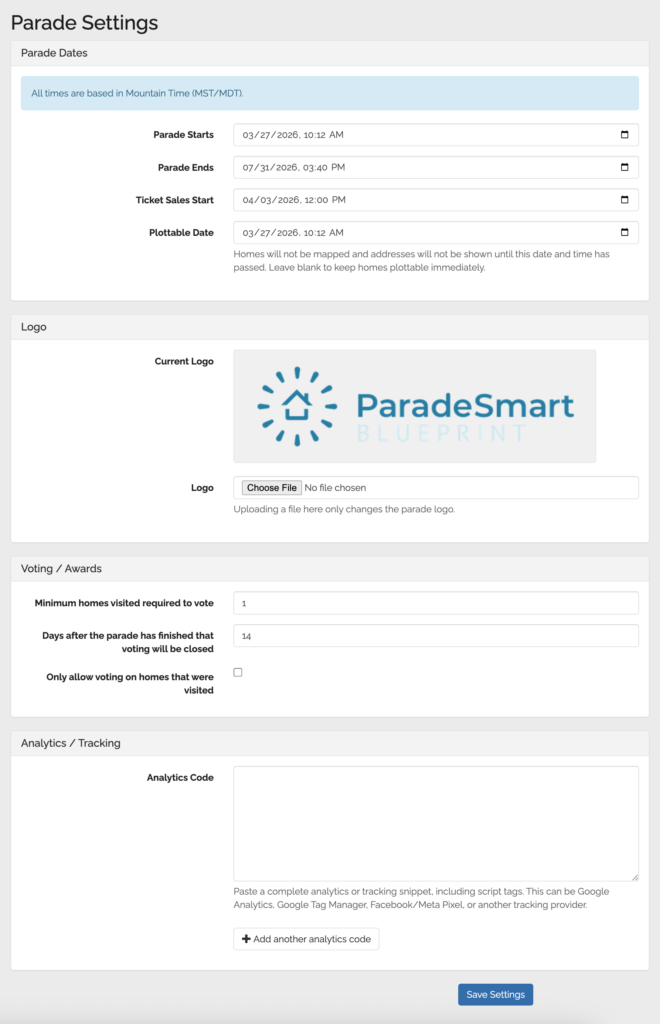
Clients can now adjust important parade settings including:
- Parade start and end dates
- Ticket sales start dates
- Plottable dates
- Voting and awards settings
- Parade logos
- Website analytics and tracking codes (If you use ParadeSmart for your event’s website)
One of the biggest improvements is the ability to manage the Plottable Date directly.
Clients can also now add their own website analytics and tracking codes directly within the dashboard, including tools like Google Analytics and Meta Pixel.
How to Access Parade Settings
Making adjustments is simple.
In the dashboard sidebar, click on Parade Settings. From there, you’ll find all adjustable parade settings in one place, including parade dates, ticket sale dates, plottable dates, voting settings, and more.
A few things to keep in mind:
- All times are based on Mountain Time (MST/MDT) since our servers are located in Utah.
- Changes are not applied automatically — be sure to click Save once you’ve finished making your adjustments.
This update makes it easier than ever to manage and test your parade setup on your own schedule.
Why This Is a Big Deal
Previously, if a client wanted to change when addresses became visible, they needed to reach out to our team so we could make those changes behind the scenes.
Now, clients can control that process themselves in real time!
Need to test your map setup before homes officially go live? Simply adjust the Plottable Date, preview and test your map experience, then change it back when you’re finished.
This gives organizers much more freedom during setup and helps reduce delays when preparing for launch.
More Flexibility, Less Waiting
We know parade timelines can change quickly, especially leading up to launch day. Giving clients direct access to these settings means:
- Faster updates
- More independence
- Easier testing and troubleshooting
- Less back-and-forth communication
- Better control over your parade experience
- Direct access to analytics and marketing integrations
As always, our team is still here to help whenever needed, but we’re excited to put more tools directly into our clients’ hands.
More ParadeSmart Dashboard improvements are on the way!