
Each Parade can add different types of users with logins to the backend system and your app. Do not create new users for builders, they are created automatically (more about builder logins).
About Users #
There are several types of “users” or ParadeSmart accounts for your team, staff and builders to access our tools. Utilizing the correct type will be crucial for allowing access and providing needed information.
Builders #
Important: Please note that builder logins are created automatically when you create your builder (more about builder logins). We do not advise creating builder logins here without extenuating circumstances. If you need help finding which login information is associated with the home follow this tutorial.
They have the ability to do the following:
- Upload and edit their builder profiles
- Edit their home information
- Scan and sell tickets for their home(s)
- View the ticket sale and scan statistics associated with their home(s)
Super Users #
Use only for trusted administration. This user type has the ability to do everything including the following:
- Edit all home information
- Scan and sell tickets at all homes
- View the ticket sale and scan statistics associated with all homes
- Add/edit all advertisements
- Add/edit all tickets sold
- Add/edit all users, builders & subcontractors
Staff #
This user type has less access than Super Users, but can still see report data and scan tickets.
Subcontractors #
This user type can only edit their profile information.
App/Api Users #
This user type is used internally for the website.
Add a User #
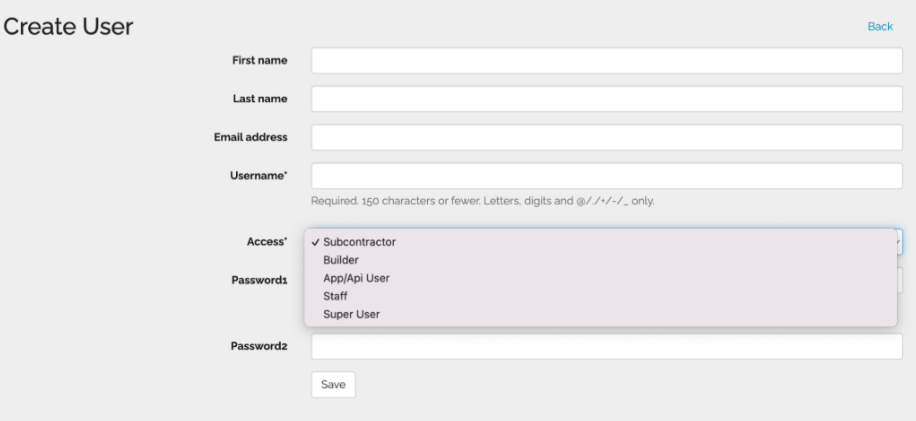
- To add a new user, just go into the manager then click “Users“
- You can choose to upload a spreadsheet with all your users information, or enter them one at a time by clicking create. Do not create new users for builders – they are created automatically (more about builder logins).
- Enter the information for your new user and select what kind of user (access) you want them to be. See access levels above.
- If this is a new user, assign them a password and forward it to them. They can use that possword to log in. If they want, they can change the password at that time.
- Hit save to complete your new user.


