
Table of Contents
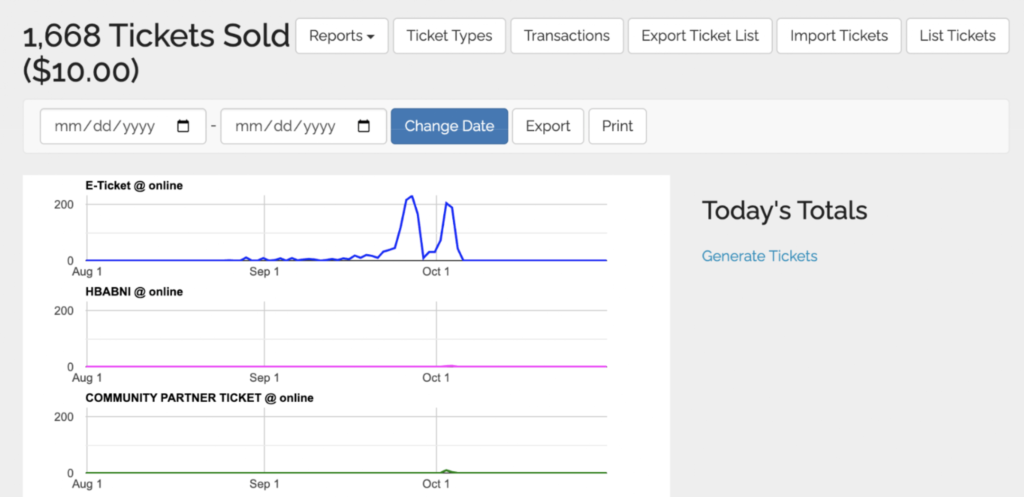
What You’ll See on the Page #
This page will show you ticket buyer demographics and purchase info. You may need to ask ParadeSmart to add these demographic questions to your checkout if you do not have them set up within the ticket purchase page.
- Your total ticket sales count at the top
- A chart of all your sales activity by type in the selected date range
- A list of all your sales by type in the selected date range
How to Read It #
Use totals carefully: this report can include free/comp tickets, while some dashboard totals may only reflect paid tickets.
The Report Export Includes #
When you click Export you will download a CSV spreadsheet file with the following information (certain columns dependent on if you collect this information):
- Ticket number
- Ticket Type
- Transaction ID
- Price
- Ticket Count (how many were purchased)
- Convenience Fee
- Donation made
- First Name
- Last Name
- Phone
- Postal Code
- Gender
- Newsletter
- Receive Emails (True, False)
- Rein
- Zip Code
- Age
- Household Income
- Occupation
- Own Home
- Future Plans
- When visitor is planning for
- Referrer noted
- Completed profile (True, False)
- Purchased On
- Sale Location


